Take control
of your content
and your publications.
The collaborative marketing solution that brings together product data, media and publications, for all your channels.
- 01Product Content & Publishing Platform
- 02Purify Service
- 03Supplier and Dealer Portals
- 04Retail Media Pilot
- 05Pimalion Studio

Take
control of
your publications
on every channel…
… and of your product content !
- E-commerce
- Catalogues & brochures
- POS & signage
- Web & mobile
- Marketplaces
- Social media
- Newsletters
- Points of sale

Manager
Approval
From product data
to multichannel publishing.
Two complementary areas of expertise, one platform.
Your product communication
is still made by hand.
Data scattered across the ERP, Excel and inboxes. Flyers put together page by page. Annotated PDFs going back and forth ten times. And every store redoing its own posters.
The problem: too much data, too many manual tasks.
Scattered data
ERP, supplier files, image folders: nobody has the right version.
Manual layouts
Every flyer, every language, every format is put together by hand.
Approvals by email
Annotated PDFs doing the rounds, corrections getting lost.
Inconsistent channels
The price in the flyer, on the poster and on the website do not match.
Digital built on copy and paste
Banners, posts, emailings: product information is gathered by hand, one item at a time.
Websites fed by hand
Records, videos, PDFs, data sheets: every asset is copied and uploaded separately.
A single source of truth. Media that update and produce themselves.
Your product records and media live in the same place. Pages are composed from this source, approved online and sent to all your channels, with no exports and no rekeying. The price in the flyer is the price on the poster, and on the website.
One foundation. Four offers. Unlimited channels.
The Product Content & Publishing Platform is the foundation: modules that take you from raw data to publication. Around it, four offers rely on the same repository. Activate the ones you need.
Supplier Portal
Your suppliers complete their own records, guided by a completion score.
Purify
AI agents extract, correct, enrich and classify your data.
Multi-label · multilingual · Fab-Dis, GS1, ETIM, BMEcat standard formats · ~180 features · cloud, hosted in Europe
Dealer Portal
À la carte catalogue and local marketing, within the retailer’s brand guidelines.
Retail Media Pilot
Inventory, budgets, briefs, production and ROI measurement.
Flyers, catalogues
POS
Posters, labels
Web
Websites, e-shops
Digital
Screens, social
CRM
Mailings
CMS
Content
A demo with your data
Never a generic demo: every meeting is prepared with an extract of your catalogue.
Close at hand
A team that knows Belgian and European retail, reachable and responsive.
Experts at your side
Pimalion Studio supports implementation and operation, from data to publication.
Benelux and Europe
Data hosted in Europe, native multilingual support, GDPR compliance.
Two value chains.
One platform.
Pimalion brings together control of product data and automation of multichannel publishing in a single environment, from raw data to published content.
Collect · Enrich · Organize · Transform · Store
Centralise, qualify, structure and enrich your product content in a single repository.
Collect
Collection, imports, connectors
Enrich
Quality, rules, AI enrichment
Organize
Repository structure
Transform
Normalisation, mapping
Store
Centralised data and media
Select · Plan · Create · Approve · Distribute
Select the content to communicate, plan its variations and distribute it across all your channels.
Select
Campaigns and selections
Plan
Formats, languages, variations
Create
Composition and graphic rendering
Approve
Approval and annotation
Distribute
Connectors and distribution
Purify
AI & Data Intelligence
PORTALS & APPS
Suppliers · Dealers · Local
PIMALION STUDIO
Implementation · Integration · Services
One foundation. Modular offers. Unlimited channels.
From sourcing to publishing,
without a break.
The platform takes you from acquiring quality product data to dynamically managing your multichannel publications. Seven steps, one interface. Each step builds on the previous one, with no exports and no rekeying.
Collect
ETL · PDM
Centralise
PIM · DAM
Orchestrate
Campaign Manager
Plan
Planner
Compose
DPS · ART
Approve
PAT
Distribute
ART · API
End to end
From raw data to a print-ready PDF, without a break and without rekeying.
All-in-one
PIM, DAM, ETL and dynamic creation of multichannel content in a single interface.
Industrialisation
All operations and campaigns automated. Up to 30% more productivity.
Multi-label and secure
Several retailers, brands or clients on one platform, each in its own space.
Import any source, keep your mappings.
The ETL quickly imports and integrates your data from Excel, CSV or web services, whatever the volume. Mapping templates are saved, anomalies detected and values harmonised. Scraping, crawling and APIs complete the collection.
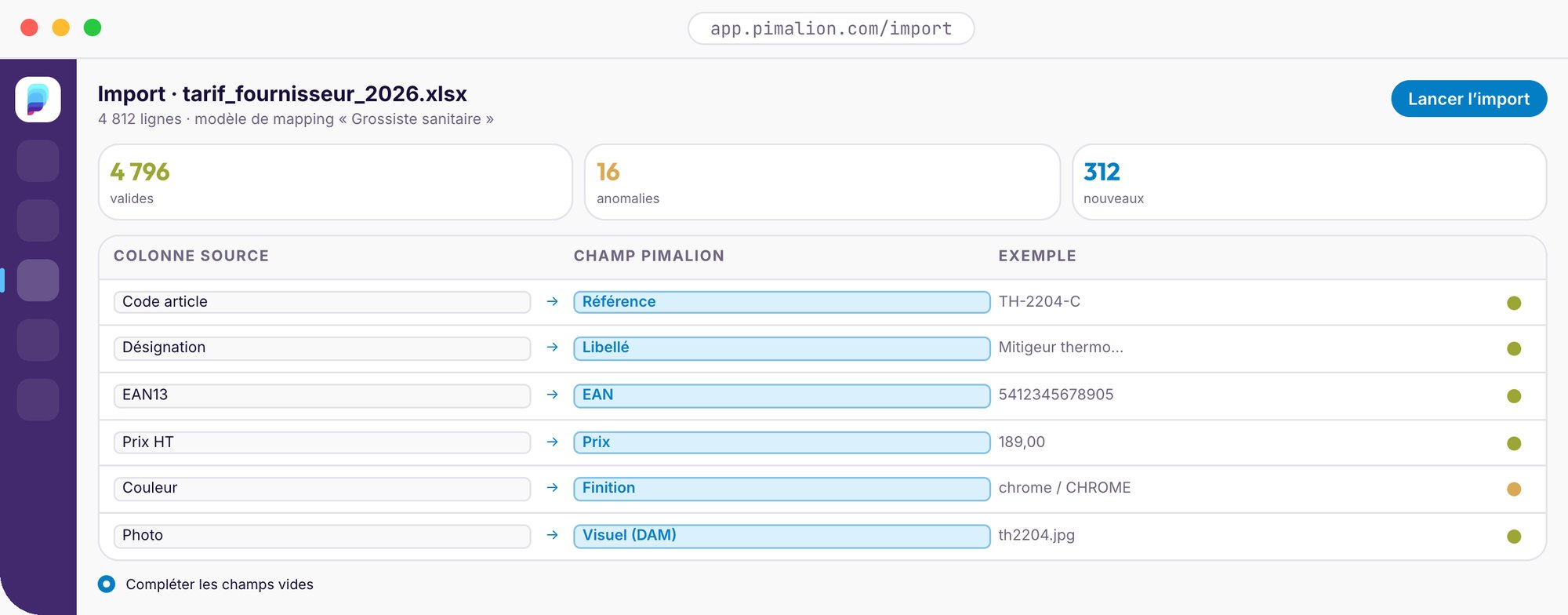
- Excel, CSV and web services import and export
- Reusable mapping templates
- Anomaly handling and value harmonisation
- Collection by scraping, web crawling and API
- Bulk data conversion
- Synchronisation with your existing systems
Around the ETL, two microservices move your data in and out continuously, with no intervention.
Continuous import of CSV, XLS, XML and JSON files, even from systems without an API.
Exports to EasyCatalog, Magento, PrestaShop, WooCommerce, Mailchimp, and custom connectors.
AI-assisted governance of your master data.
The PDM centralises, acquires, transforms, consolidates and exports your master reference data. It supports the market’s exchange formats, builds and optimises your nomenclature, classifies your products and measures the quality of your data.
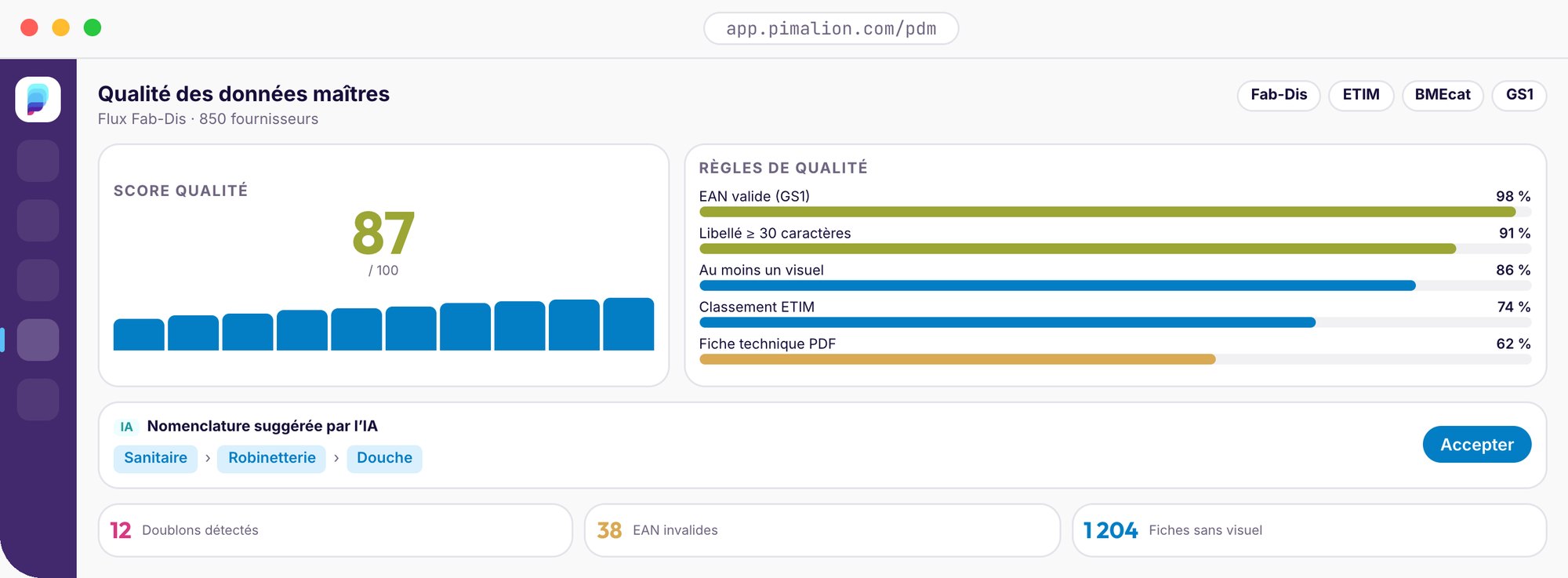
- Fab-Dis, ETIM, BMEcat and GS1 exchange formats
- AI-assisted nomenclature and taxonomy
- Semi-automatic classification, attribute extraction
- Normalisation, unit conversion, deduplication
- Completeness scoring and quality tracking
- Automatic feeding of the PIM and DAM
The dynamic repository for your product records.
The PIM centralises all the information in your product repository. Data models, dynamic and calculated fields, languages and destinations: every record is ready to feed your publications, and you always know where it has been used.
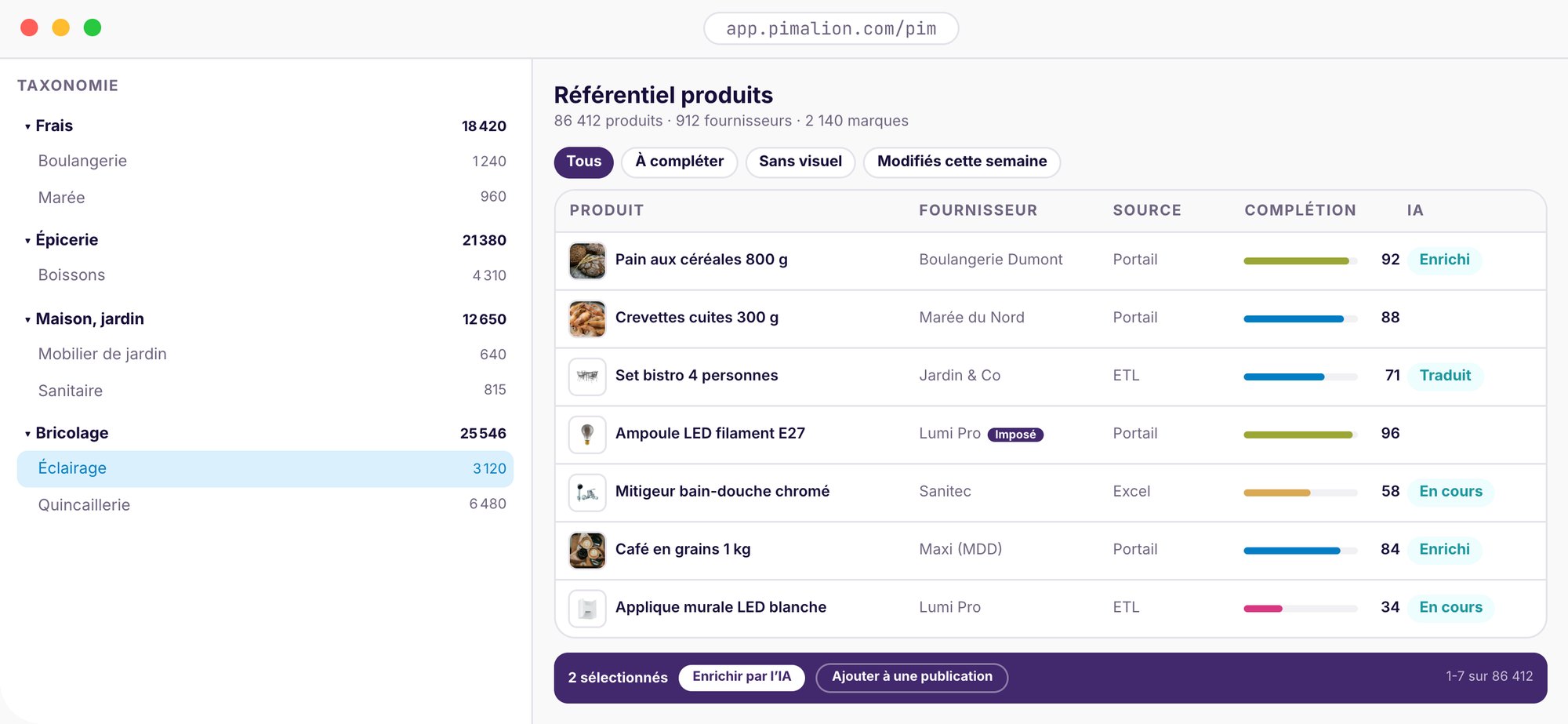
- Data models, option lists and calculated fields
- Management by language, destination and entity (multi-label)
- Field completeness indicators
- Field-level history, version comparison
- Usage history across publications
- Preview via graphic templates or PDF
All your media, archived, found, transformed.
Photos, videos, vector files, PDFs, 3D files: the DAM archives everything. Media are linked to products automatically by naming rule, searched by label, channel, supplier or brand, and transformed on the fly for each medium.
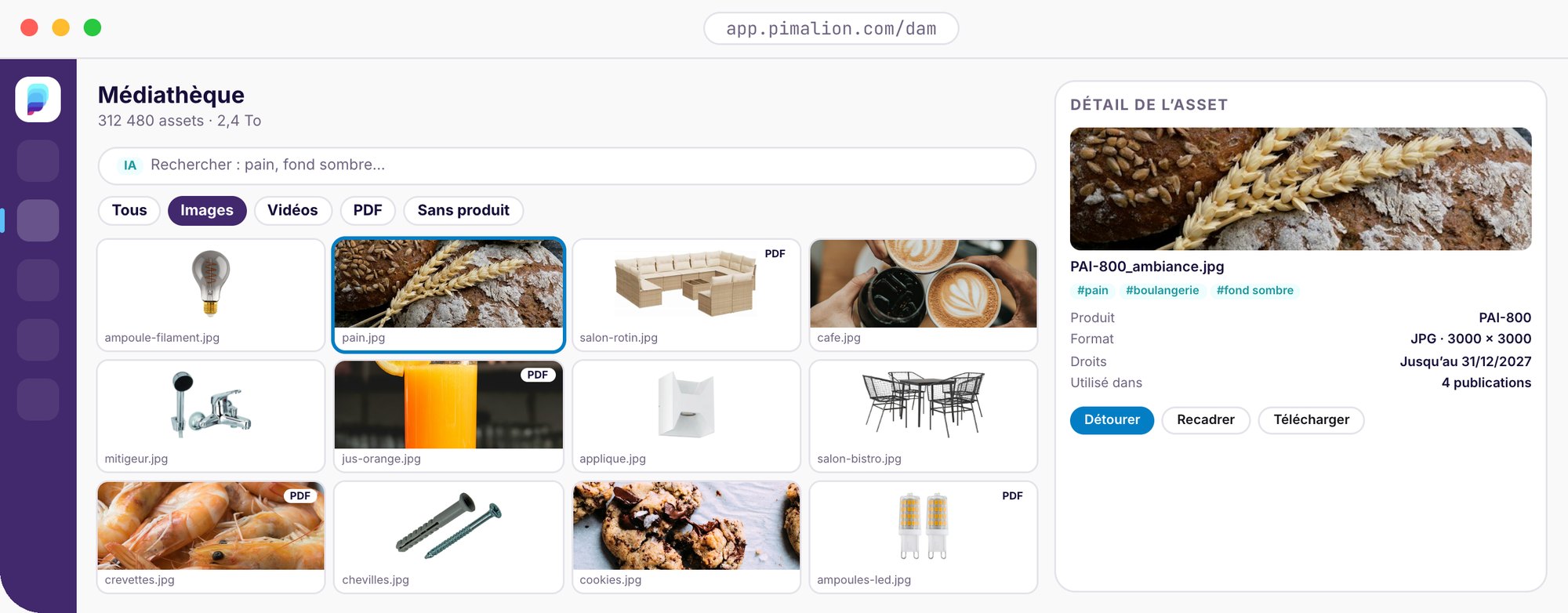
Image processing and IPTC/XMP indexing: 100,000 HD images an hour.
Syncs external DAMs: local server, Dropbox, sFTP, agency websites.
- All common formats, unlimited storage
- Automatic linking of media to products
- AI recognition: subjects, objects, logos, colours, OCR
- Background removal, cropping, resolution optimisation
- Rights, usage validity, IPTC metadata
- SharePoint, Dropbox, Google Drive, sFTP sync
Manager
What do we want to communicate?
Before talking about media, a campaign has to be decided: its operations, offers, products, content, periods, markets and targets. The Campaign Manager sets out this foundation once. The Planner then turns it into publications, and the rendering engine produces them.
What do we want to communicate?
Where and how will we express it?
How do we produce it automatically?
- A campaign defined once, picked up by every medium
- Offers and products attached to the operation, not to each page
- Periods, markets and targets decided upstream
- Marketing decides the message, the Planner its expression
- A clear view of everything communicated, and when
- Linked to the PIM, the DAM and the Planner
Campaign
The message: offers, products, targets
→ Plan
Media, editions and languages
→ Render
Renders, by the rendering engine
→ Validate
Online approvals, with the PAT
→ Publish
Print, POS, web, digital, CRM
Where and how will we express it?
The Planner turns each campaign into publications: media, editions, formats, languages, channels, dates and variations. Each publication has its channel, its steps and its status, online and offline. The campaign’s products are dispatched automatically to each channel.
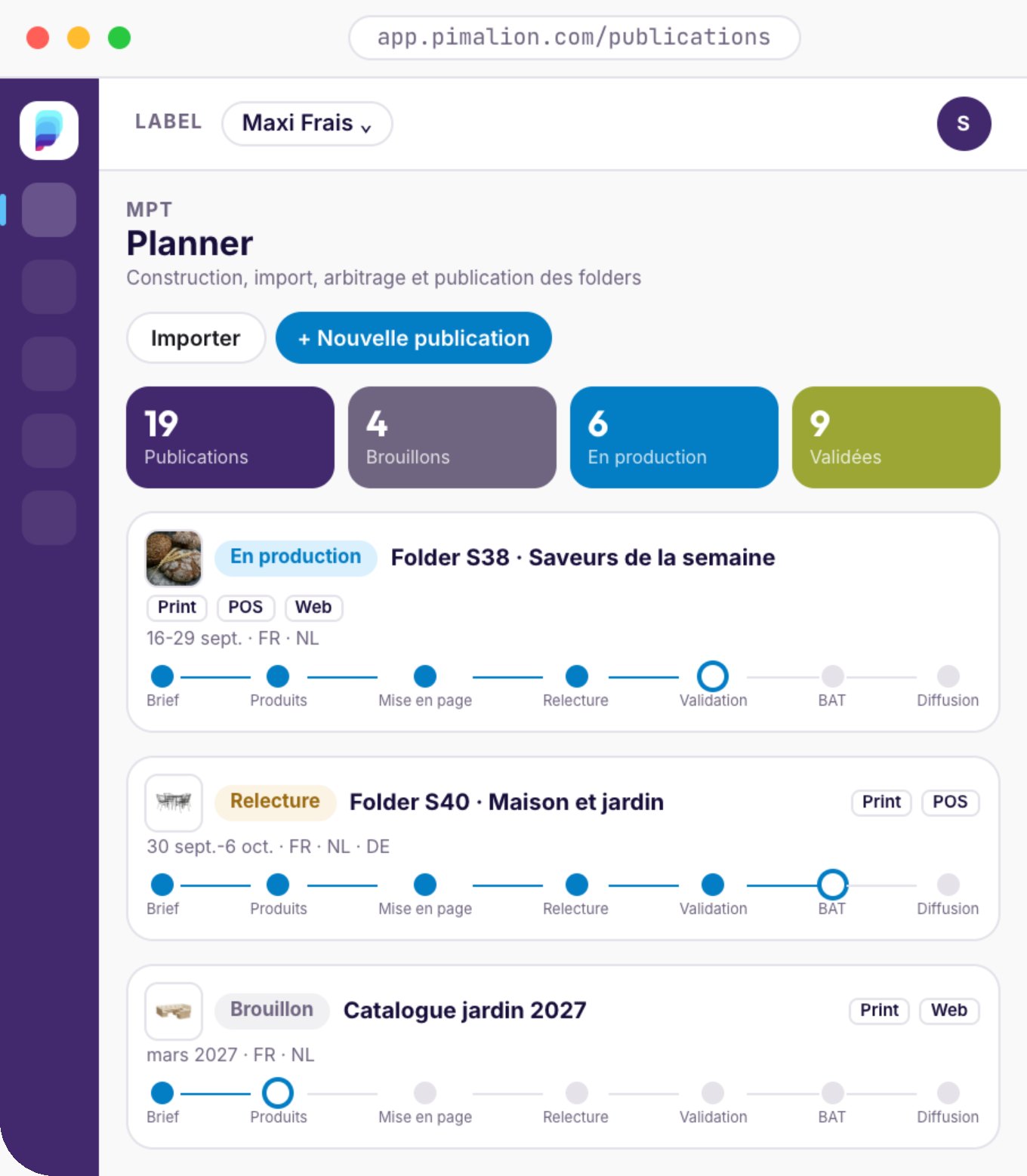
- Planning, editing and sorting of publications
- Promotional activation plan
- Editions, formats and variations per medium
- Automatic dispatching of products to channels
- Statuses, favourites and archives
- Multilingual publications
Thousands
of operations run through the Planner, for eight clients, since 2016.
By name, date, channel and medium
Campaigns and operations sorted according to your own logic.
One operation, all its media
Flyer, posters, web, screens: adapted automatically.
Linked to the Campaign Manager and the PIM
The campaign sets the message, the pages go to the rendering engine.
Campaign
Offers and products
Products
Selection in the PIM
Layout
Rendering engine or InDesign
Review
Online annotations
Approval
Step by step
Proof
Final signed-off proof
Distribution
Print, POS, web, digital
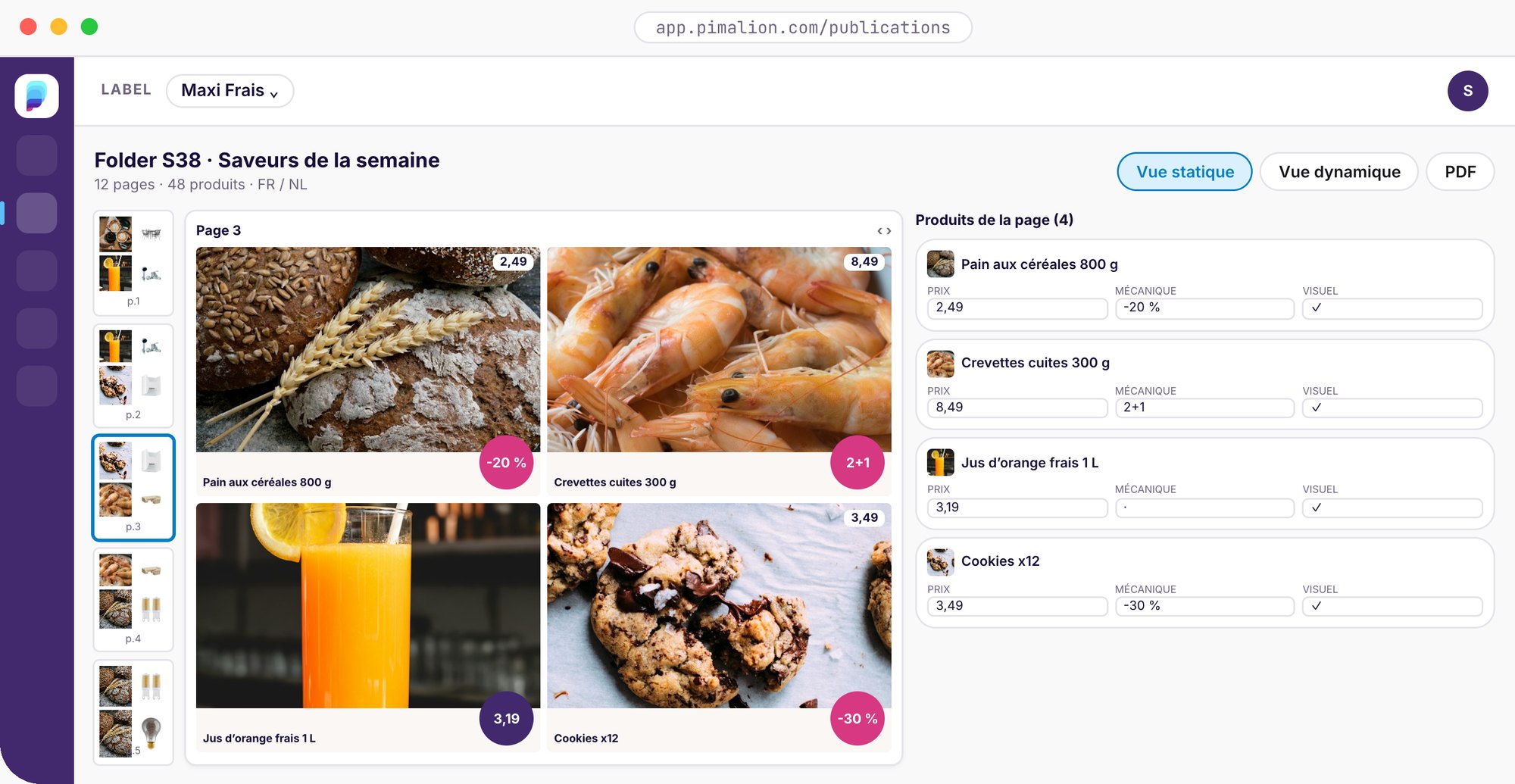
Your pages are built from your data.
Flatplan, templates, placements, pagination: pages are built from the PIM and the DAM, and the PDF is generated. Print in page mode, digital and web in grid mode. Each channel has its technical constraints (format, resolution, file size, template): the ART rendering engine, built into the DPS, generates any format while respecting them. And if your studio works in InDesign, Pimalion connects to it via EasyCatalog.
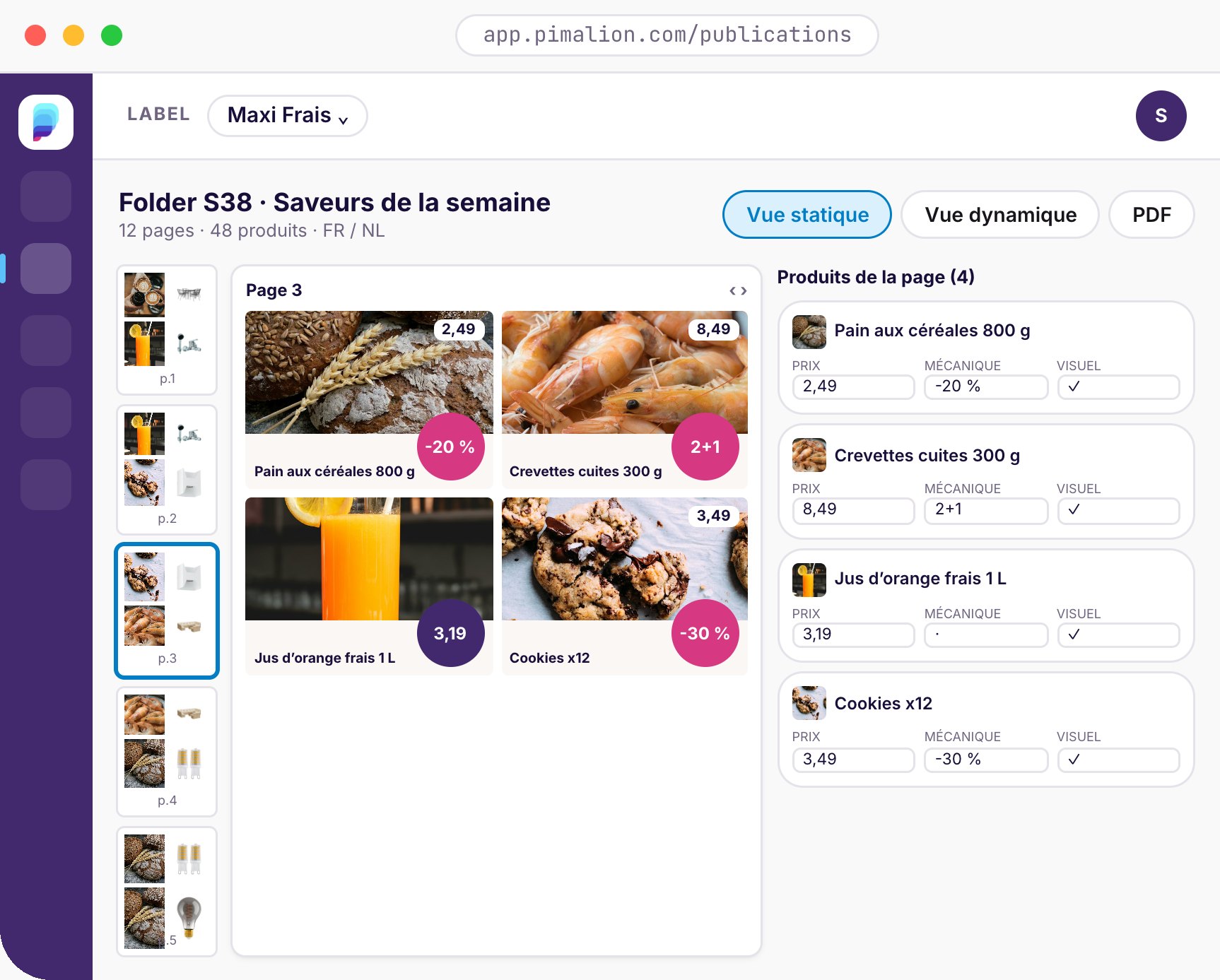
Catalogues built automatically
Families, ranges, pagination: the catalogue is composed from the repository.
Product presentation templates
Price, mechanic, visual: every product block follows the brand guidelines, every time.
Your studio keeps its tools
Live ODBC connection: InDesign pages update from Pimalion.
The rendering engine that builds and adapts your media.
The cornerstone of publishing, digital publishing in particular. ART automates the building and adaptation of your print, digital, web and in-store media. With Pimalion, your data and content are automatically turned into graphic renders tailored to each medium and each channel.

Fresh orange juice 1 L
- Promo price
- €2.55
- Mechanic
- -20%
- Brand
- Maxi Frais
- Languages
- FR · NL
€2.55 €1.99
 €2.49
 €4.29-20%
Print in page mode
Flatplan, templates, pagination: print-ready PDFs.
Digital and web in grid mode
Banners, screens, social, web pages: HTML, PNG and JPEG renders.
Each channel’s constraints
Format, resolution, file size, template: every render respects them.
Automatic adaptation
The approved flyer becomes posters, shelf wobblers and labels, store by store.
generated in ~20 minutes, every week.
“Our communication to customers is consistent across the different media, and everything happens in real time.”
Review, annotate and approve online.
Marketing, buyers, studio and agency annotate directly on the page, comment and each approve their own step. Revisions are compared, reminders go out automatically. The same workflow applies to every channel: flyer, poster, banner, post, emailing or web page. No more PDFs bouncing around by email.
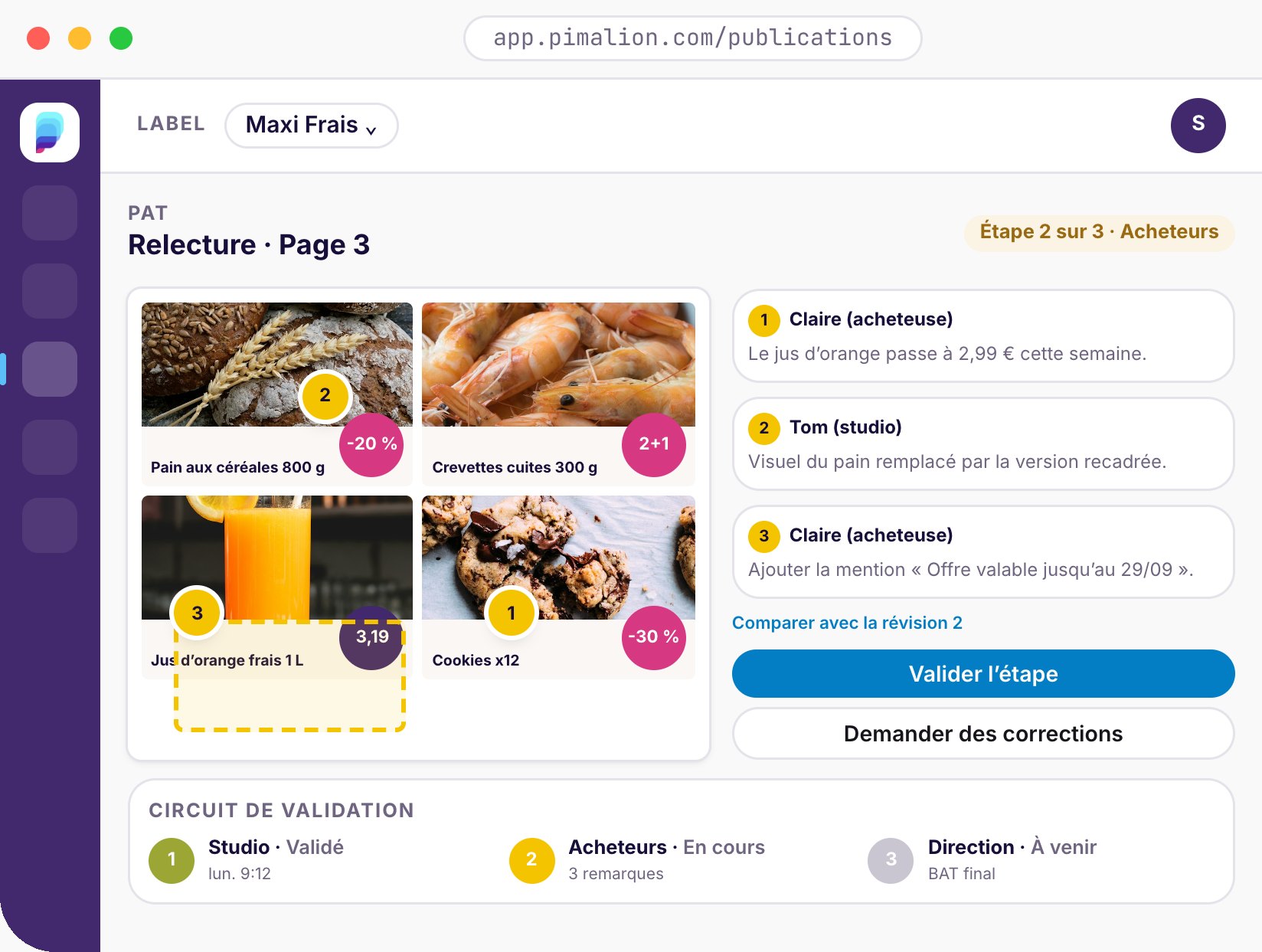
- Workflows between stakeholders, several review steps
- Annotations by pointer or sticky-note area
- Revision comparison
- Chat, comments and file sharing
- Automatic notifications and reminders
- Direct access to the PIM and DAM from the page
- One workflow per channel: print, POS, web, digital, CRM
- Actual-size preview of each medium
- Annotated PDFs doing the rounds by email
- Contradictory comments, with no reference version
- Manual chasing to get approvals
- Corrections rekeyed one by one in the layout
- Annotations are placed on the page itself
- Each revision is compared with the previous one
- Reminders go out automatically, step by step
- Corrections are made in the PIM, the page follows
Unlimited channels, one single source.
Create as many channels as you need, grouped into six main families. Each has its technical constraints: Pimalion handles them automatically.
Flyers, catalogues, leaflets.
Automated flatplan, templates, CatalogBuilder: print-ready PDF pages.
POS
02In-store posters and labels.
The flyer adapted automatically into price posters, shelf wobblers and labels, for each point of sale.
Web
03Websites, e-shops, online catalogues.
Text and images driven from Pimalion, automatic updates, preview of the final render.
Digital
04Screens, banners, social media.
Any digital medium fed in real time, within the brand guidelines. HTML and CSS rendering.
CRM
05Mailings and marketing automation.
PIM and DAM connected in real time to your CRM: product renders for your emailings, at scale.
CMS
06Website content and display.
Connected to the market’s standard CMSs: content and graphic presentation, updated very quickly.
A true technology hub.
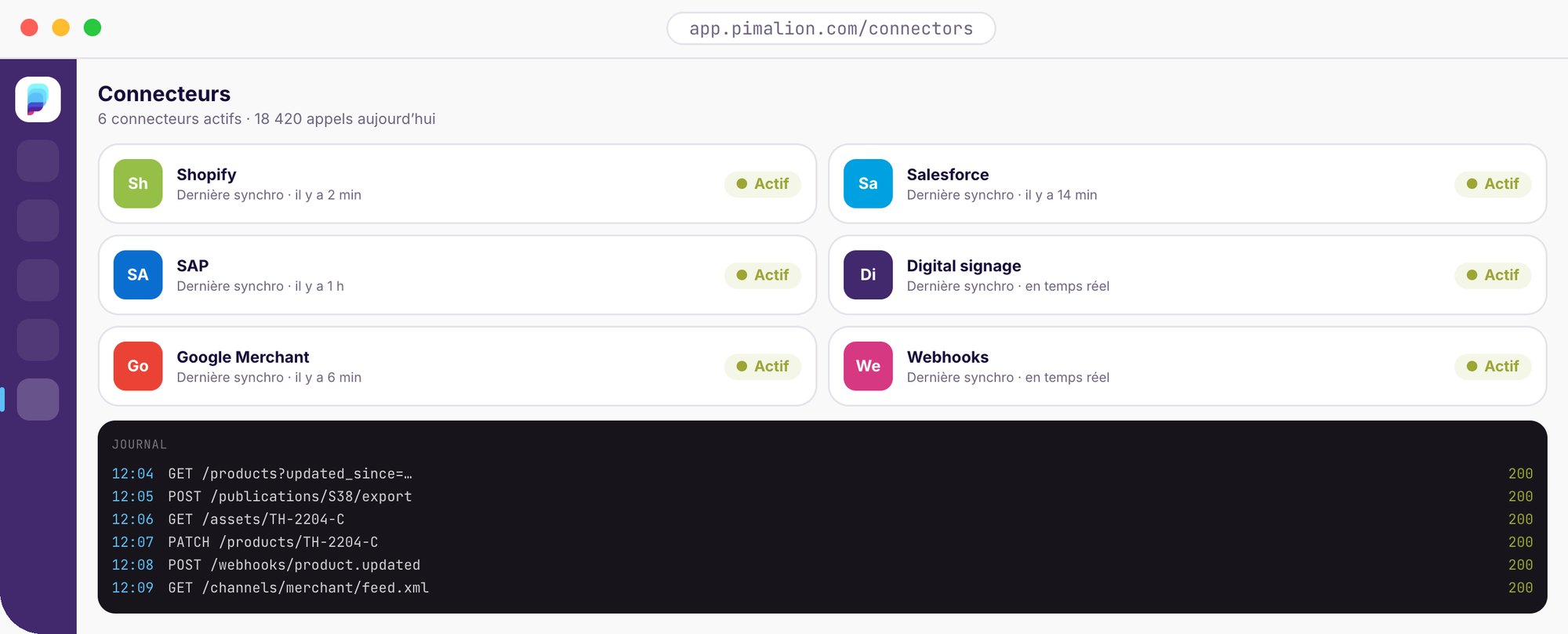
ERP, CRM, CMS, e-shop, marketplaces, digital signage, mailing: the REST API exposes your data and publications. Plug and play, nothing to install.
AI and data expertise driving the quality of your product content.
Collect, enrich and make your product data reliable at scale.
Purify orchestrates several specialised AI agents, configured by our data experts, to extract, correct, enrich and classify your data, whatever its source. Your PDF catalogues, Excel files, images and texts become clean records, ready to publish.
Independent service: Purify integrates natively with the Pimalion PIM, and also connects to any external PIM or server.
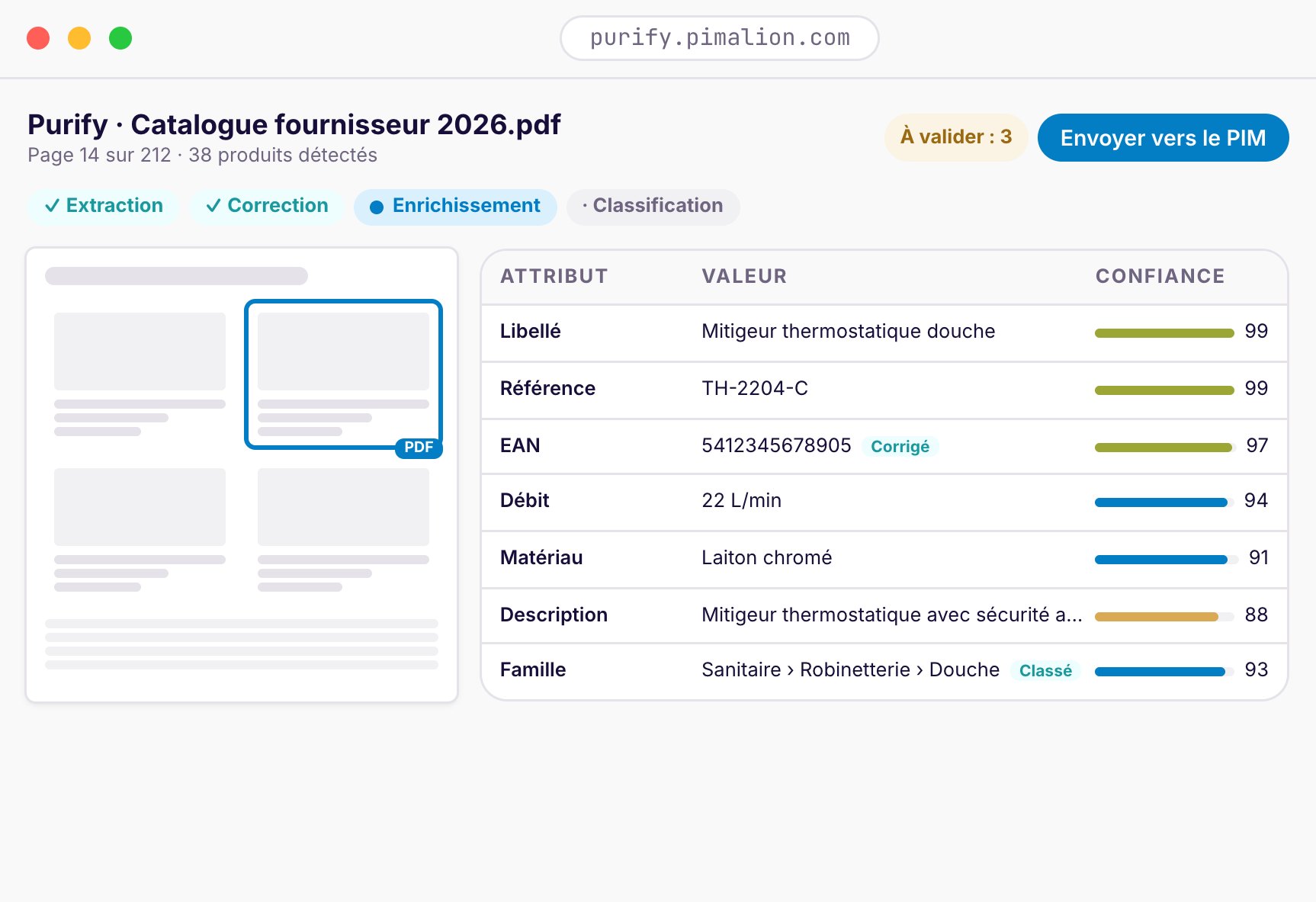
Extraction
Attributes are read from your PDFs, Excel files, images and unstructured text.
Correction
Errors, inconsistencies and duplicates are detected and corrected.
Enrichment
Descriptions, missing attributes and translations are completed.
Classification
Every product finds its place in your nomenclature.
From raw data to publishable records, in record time.
Every source
PDFs, Excel files, images, unstructured text, and more.
Your existing systems
Purify integrates with your PIM, ERP and DAM via APIs.
AI powered. Expert controlled.
Our data experts tune the orchestration to your business needs and quality requirements.
- 1Digitising PDF cataloguesYour PDF supplier catalogues become structured records.
- 2Multi-source harmonisationHeterogeneous feeds brought into a single data model.
- 3AI ReviewerEvery publication is proofread by AI: consistency between your data and your media, prices, legal notices, typos.
- 4GS1 completenessThe attributes required by the standard are identified and completed.
- 5E-commerce optimisationRicher, better classified, better referenced records.
- 6Product imagesMissing visuals are searched for, retrieved and linked to the right records.
- 7SEO, GEO and FAQText optimised for search engines and generative AI, product FAQs generated.
- 8TranslationRecords and attributes translated into all your languages, using your vocabulary.
850+ suppliers, 100+ quality rules.
Fab-Dis data is loaded automatically, images and PDFs linked in the DAM. Every record is checked against more than 100 rules set by the buying group, and Purify extracts, corrects and enriches whatever is missing.

Accelerate with
Pimalion Studio.
Our experts support your in-house teams.
For a study, a quote, one-off extra capacity or more complete support, Pimalion Studio gives you a team that already knows the platform, product data, integration and digital production.
Study & scoping
Analysis of your needs, advice and a tailored roadmap.
Integration
Connecting your systems, data migration and go-live.
Migration
From your existing tools to Pimalion, with complete peace of mind.
Configuration
Data models, workflows, rules and channels adapted to the way you work.
Templates & rendering
Print and digital templates, in your brand guidelines and your formats.
Digital production
Layout, multi-format adaptation and production of your content.
Data services
Quality, enrichment, structuring and preparation of your product data.
Managed services
Long-term support, tailored to your needs, to gain efficiency and autonomy.
Ask for a study,
a quote or one-off help.
Project support · operational reinforcement · à la carte support
Technology powered by
expertise.
Our experts support the implementation and operation of the platform, from data to publication. Services, expertise, integration, data services, digital production: the same team knows your project, from the first import to the last medium.
Data onboarding
Your supplier and historical data loaded, mapped and checked.
Migration
From your current PIM, DAM or files, with nothing lost.
Integrations
ERP, CRM, CMS, e-shop: connectors set up and monitored.
Configuration
Data models, workflows, rights and channels, following your logic.
Template creation
Your print and digital templates, built in your brand guidelines.
Graphic automation
Engine rules tuned so that your media produce themselves.
Digital and web production
Banners, websites, web catalogues: with you or for you.
Data services
Quality, enrichment and Purify, run by our data experts.
Business support
Training, change management, best practices.
Managed services
We run all or part of the platform for you.
Alongside your agencies, not in their place.
Pimalion Studio is not an agency competing with your agencies. We equip, configure and automate production. Creative work and strategy stay with your teams and your agencies, who work in the same platform.
From data to publication, a single
point of contact.
A “pure” SaaS vendor delivers a licence, then leaves you alone with an integrator.
At Pimalion, the platform and the expertise come from the same team.
The platform ready, with your data
Your data loaded and checked, your systems connected, your workflows in place.
Your media produced from the data
Templates in your brand guidelines and engine rules: pages compose themselves.
A team at your side, for the long term
We produce, enrich or operate with you, at the pace of your campaigns.
- A licence, then a third-party integrator
- Data to migrate and clean up on your own
- Templates to create yourself
- Vendor support far removed from your business
- Responsibilities split between vendor and integrator
- Changes billed again for every new need
- A single point of contact, from the first import to the last medium
- Experts who know the platform from the inside
- Your templates and automations built with you
- Data services and managed services, if you wish
- Clear responsibility, end to end
- Changes delivered by the team that designs the platform
The platform
Data, campaigns, plans, renders, approval and distribution in a single tool.
Our experts
Data, integration, templates and production: the product content professions.
Your agencies and your teams
They keep creative work and strategy, in the same platform.
Open your repository. To whoever
you choose.
The portals extend the platform outwards: to the suppliers who produce the data, and to the network that uses it: members, franchisees, stores. Records are exchanged in the market’s standard formats: Fab-Dis, GS1, ETIM. Two products, not one block: take one, the other, or both.
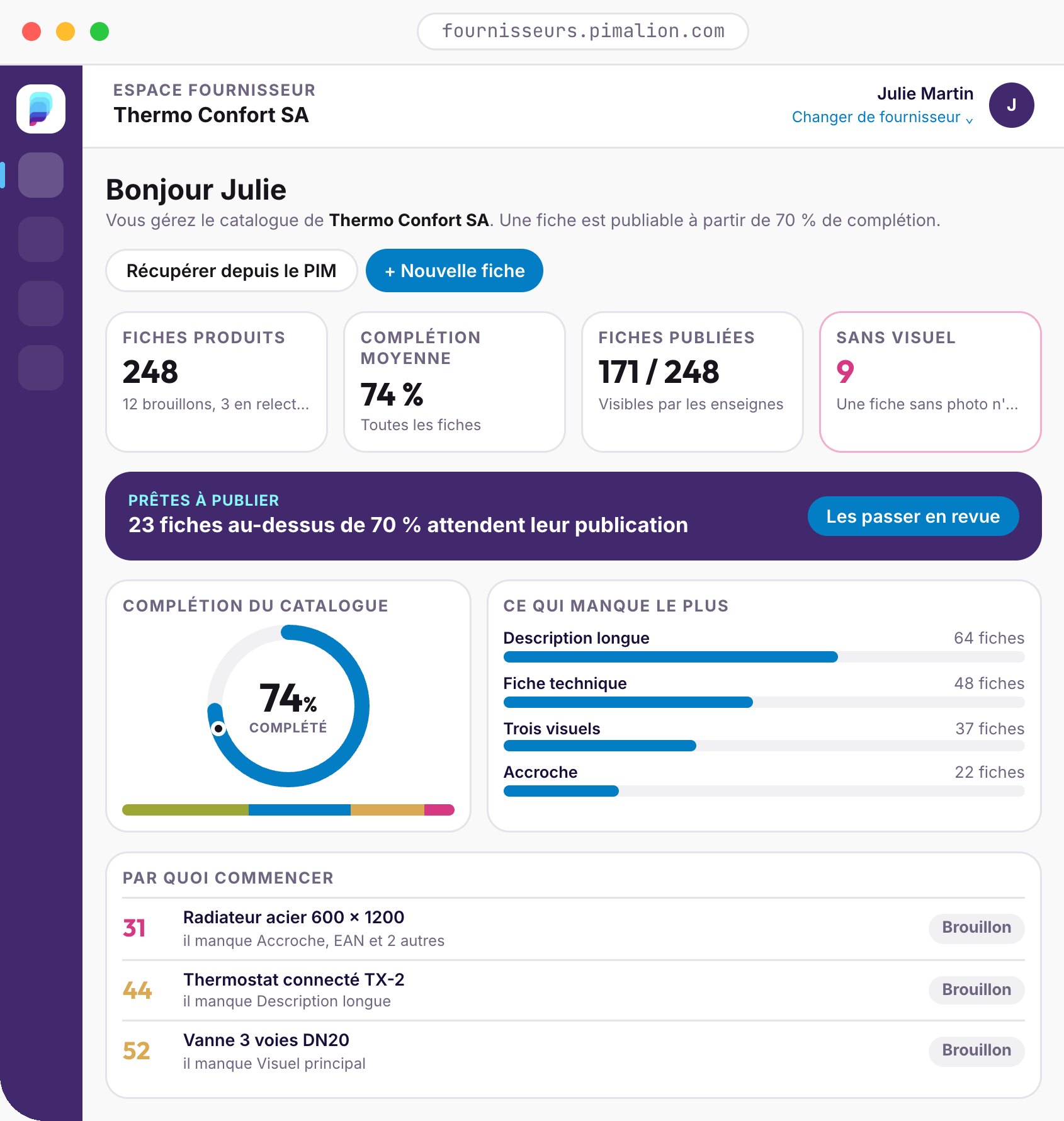
Supplier Portal Independent
Your suppliers complete their own product records, guided by a completion score, and publish them to your PIM.
For retailers and buying groups that receive supplier data.
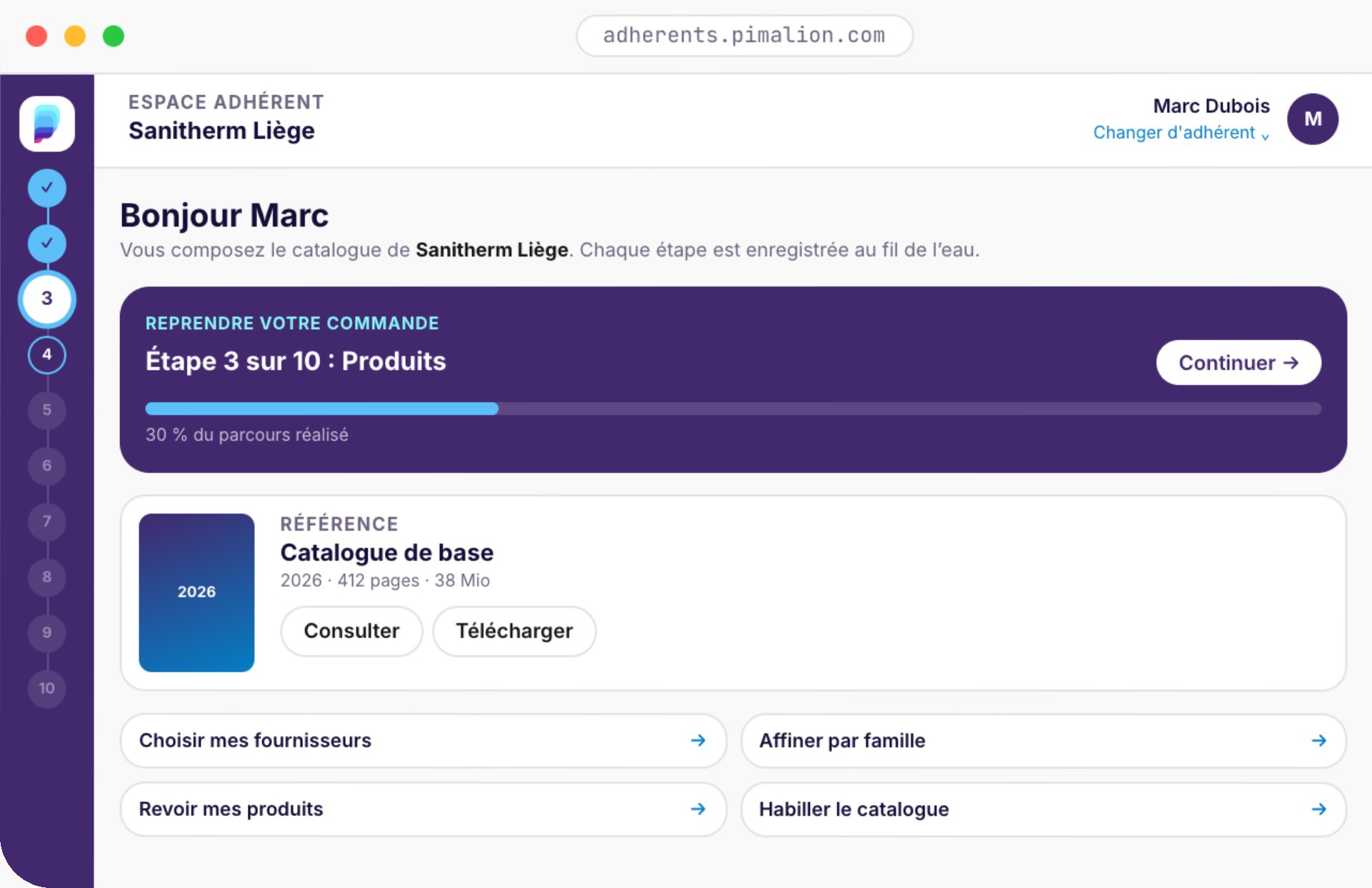
Dealer Portal Independent
Members, franchisees or stores build and order their catalogue, and produce their local marketing within the brand guidelines.
For buying groups, cooperatives and franchise networks.
One Pimalion account
Single sign-on. One account can manage several companies or stores.
In your banner’s colours
Logo, colours and vocabulary: every portal can be white-labelled.
Saved as you go
Automatic drafts, resume at the exact step, nothing is lost.
Plugged into the platform
No copies, no exports: the portals read and write the repository.
Suppliers only
An integrated retailer that wants complete records, with no rekeying.
Dealers only
A buying group that already manages its data and wants to equip its network.
Both
The complete chain: from supplier to point of sale.
Your suppliers complete their
records. You stop rekeying.
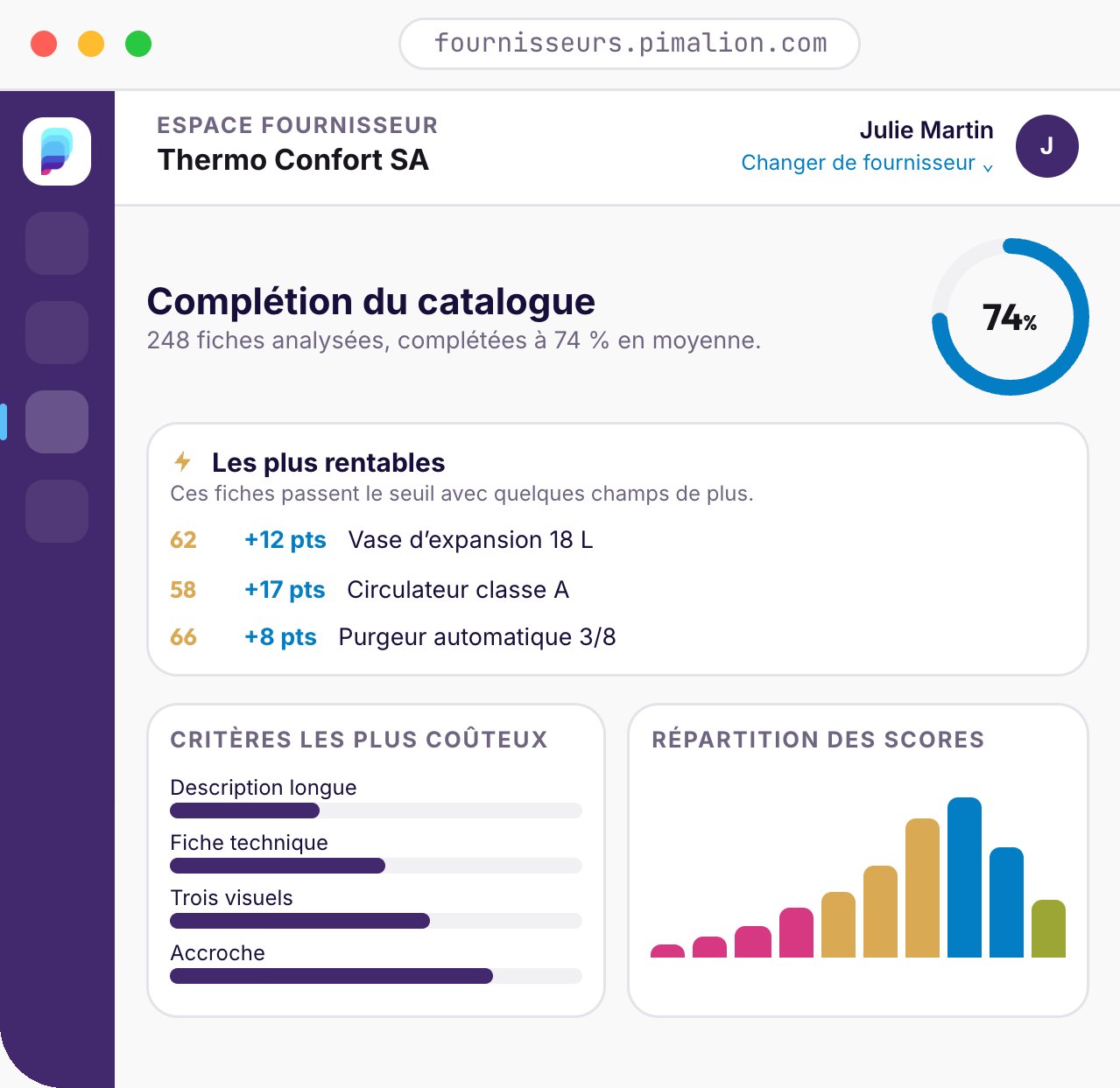
Every supplier gets its own portal: product records, visuals, documents. A completion score shows what is missing and where to start. Once a record is ready, the supplier publishes it: it goes straight into your PIM.
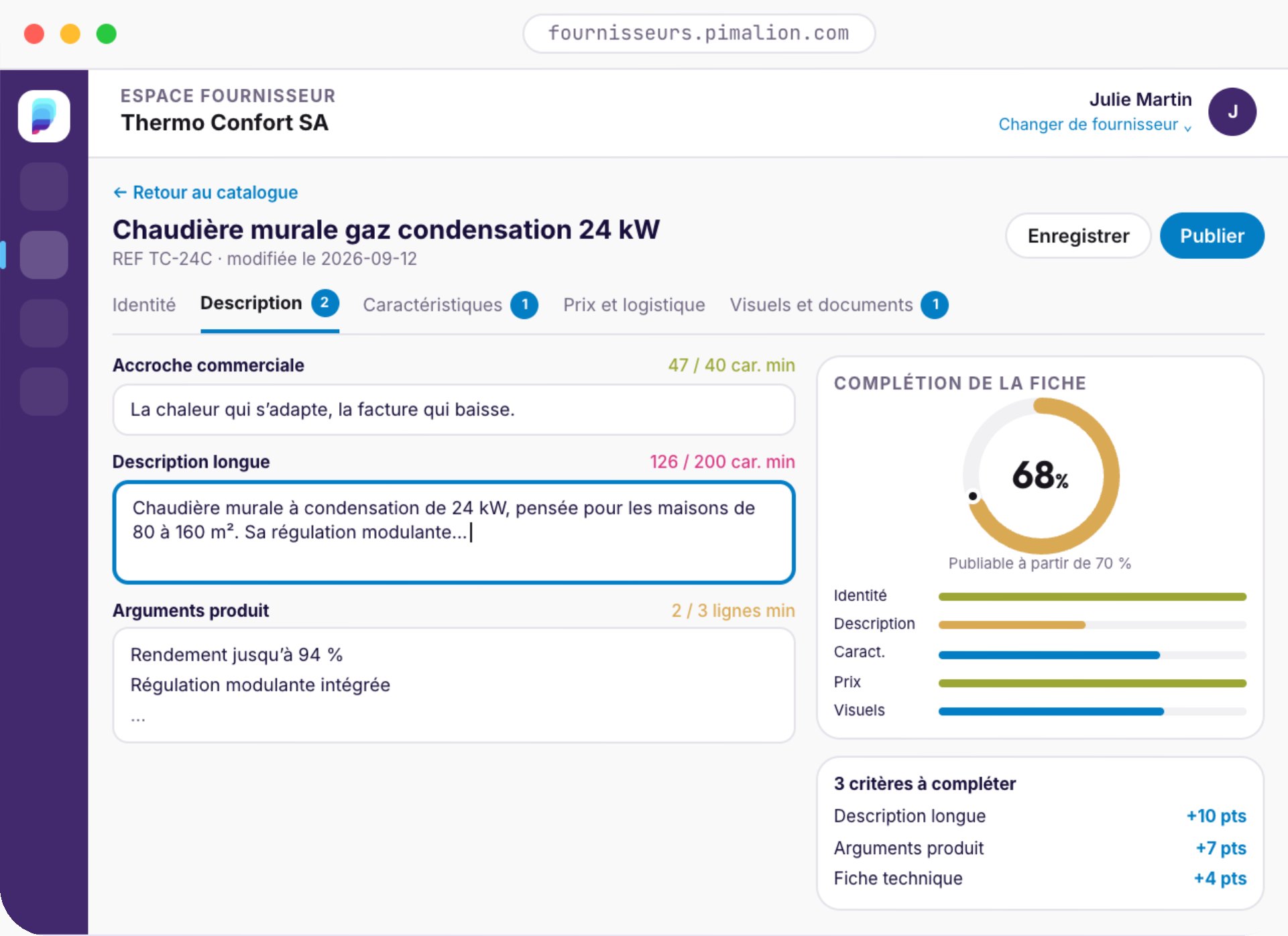
Retrieve
The supplier imports what the PIM already knows about its products.
Complete
Identity, description, specifications, pricing, logistics, visuals and documents.
Prioritise
Criteria are ranked by points lost: highest value first.
Publish
From 70%, the record goes into the PIM and becomes read-only.
A clear dashboard
Where am I, what is blocking, where do I start. Every counter opens the list it summarises.
Bulk actions
Publish, return to draft, archive in batches. Imports run on the server and can be tracked.
One account, several companies
One Pimalion account manages several suppliers and switches between them in one click.
A score that measures quality
A four-word description does not count. The tagline needs 40 characters, the long description 200.
Linked visuals and documents
Packshot, lifestyle shot, data sheet, manual, certificate, video: every file has its role.
Field-by-field history
Every change is tracked with its date, its author and the before and after details.
Every entity builds its own catalogue.
In eight steps.
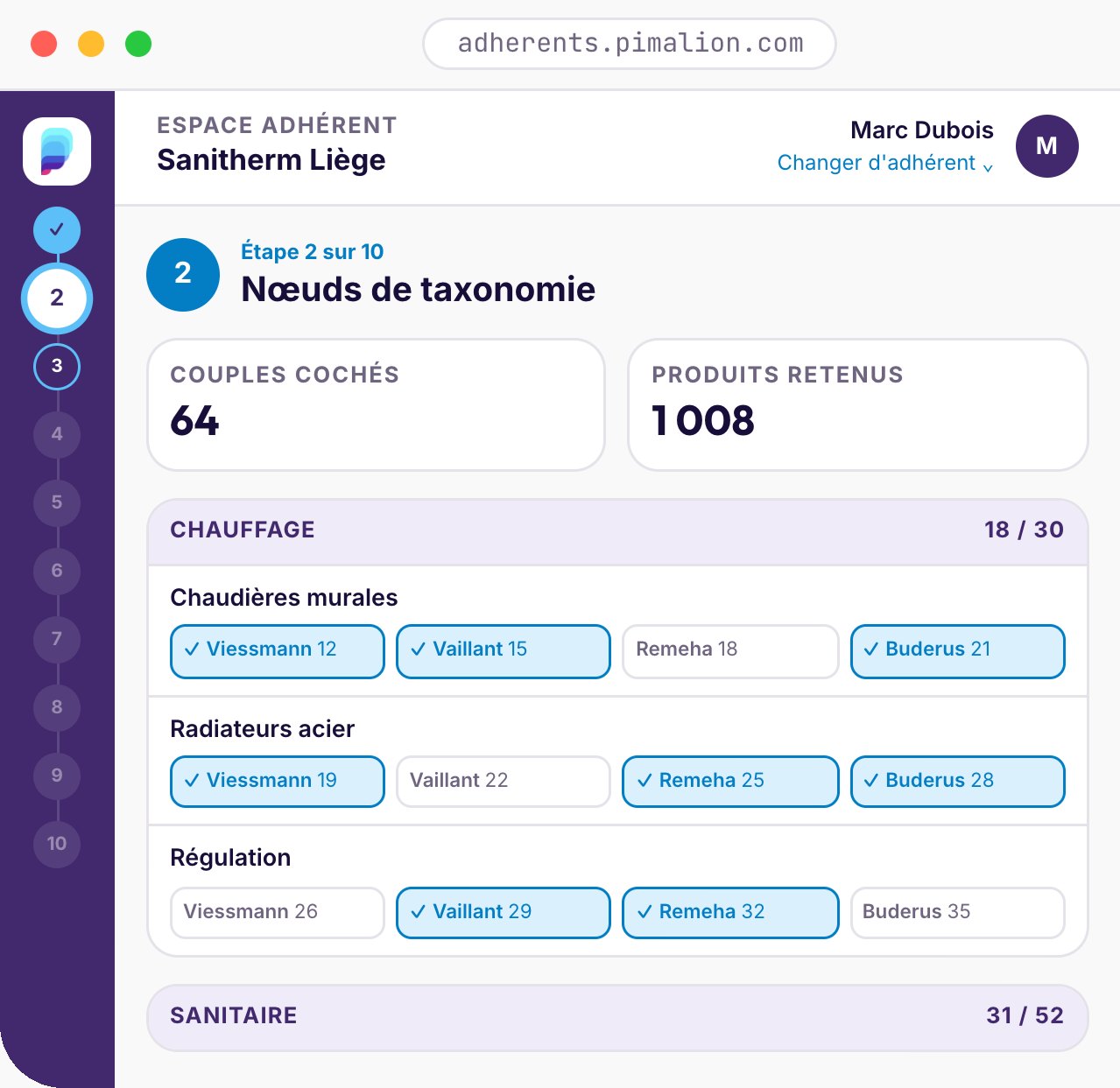
Store, member, franchisee: each entity starts from the central repository: suppliers, brands, families, products. It keeps what it sells, dresses it in its own colours, chooses its media and places its order. It can stop and pick up again whenever it likes.
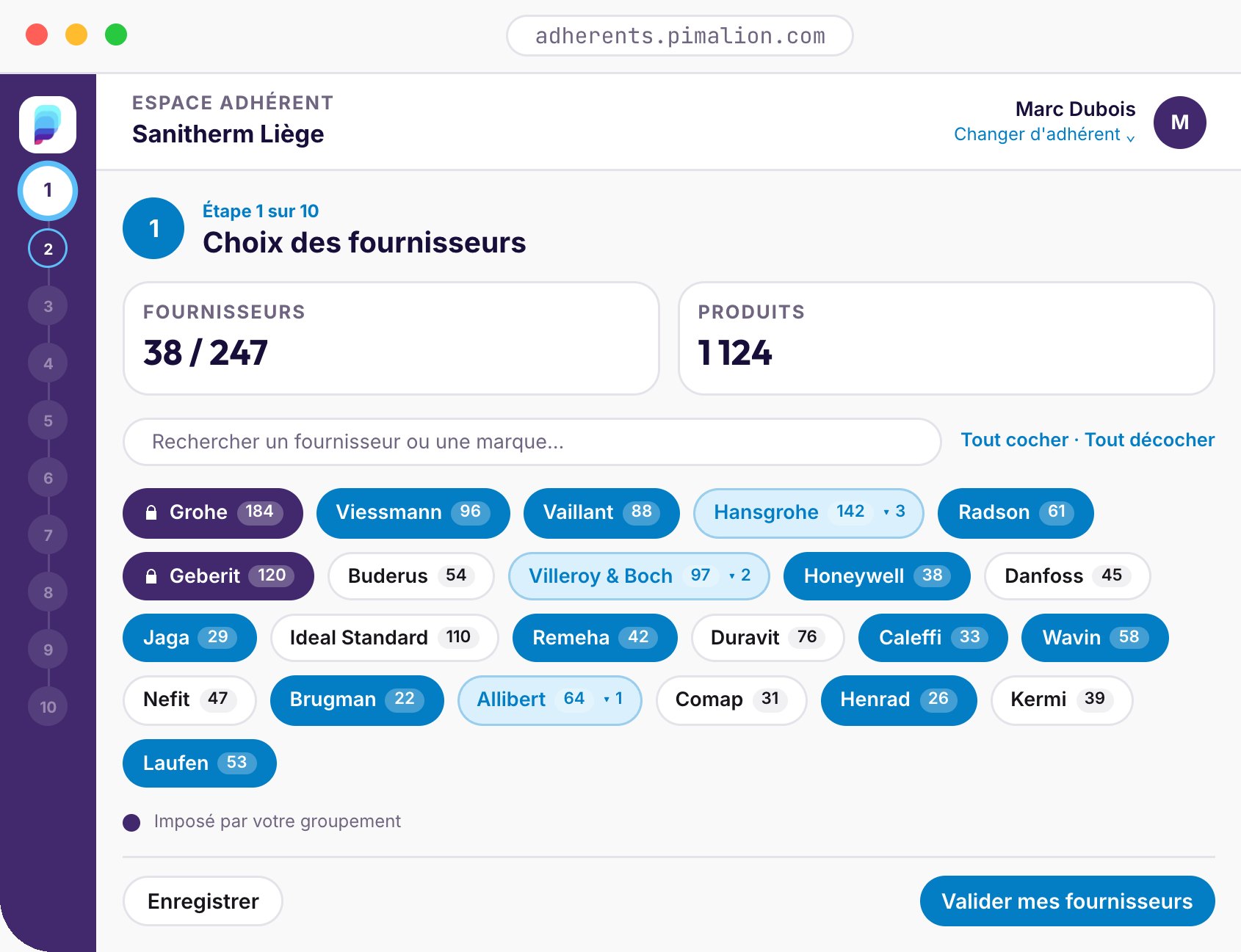
Suppliers
Switch on, switch off, keep only some brands.
Families
Select by brand and family combined.
Products
Remove, add out-of-scope items, tweak a record.
Preview
The flatplan and the proof PDF in one click.
Outputs
Print, web, quotes, campaigns, QR codes.
Branding
Cover, company page, back cover.
Settings
Print run, price display, UTM tagging.
Order and delivery
The configuration goes to the agency, which produces and delivers.
What would you like
to do today?
A store manager is not a designer, a marketer or a print buyer. The portal starts from what they want to achieve, recommends a pack of ready-to-use media, and keeps the retailer’s brand guidelines locked.
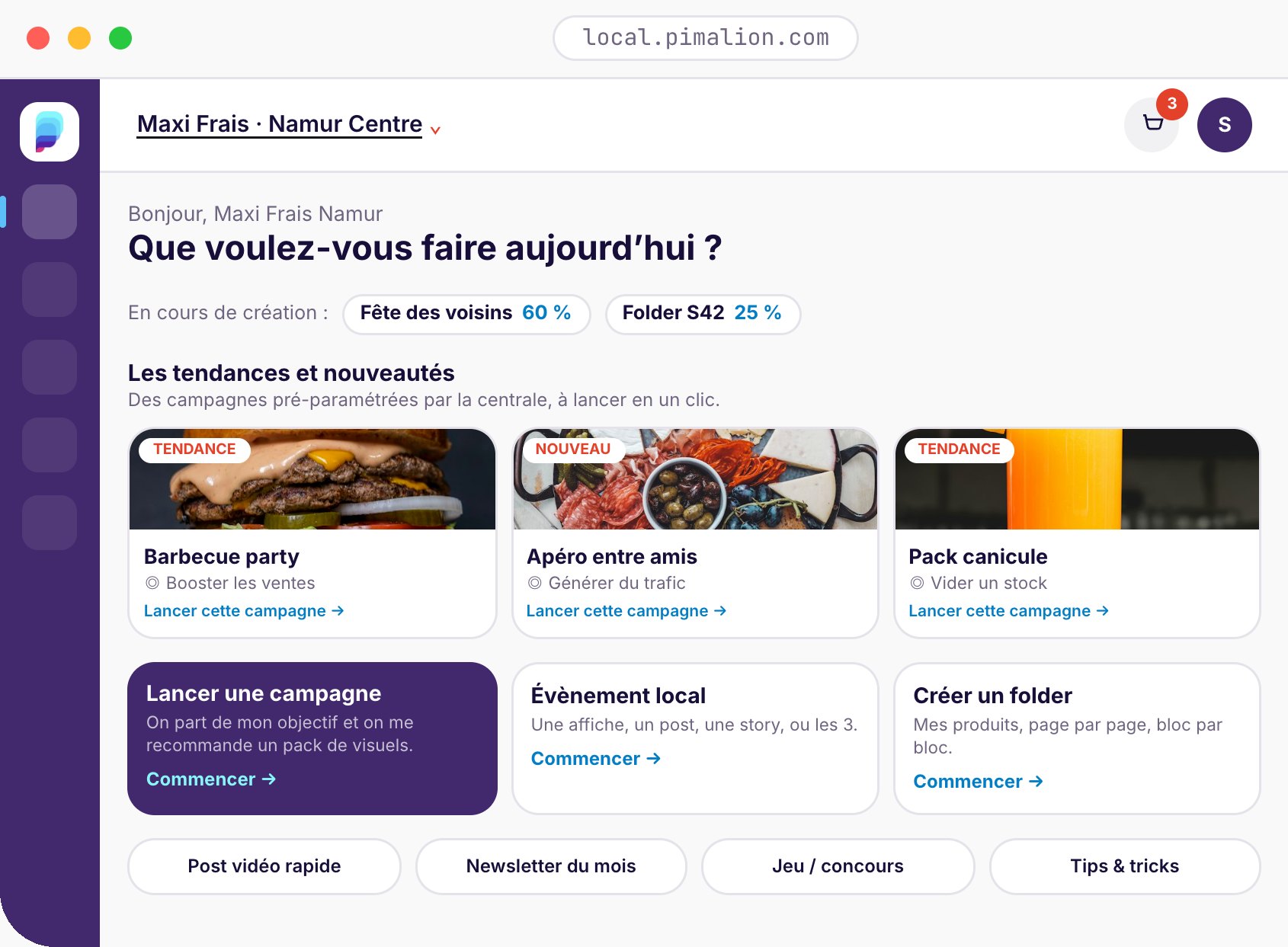
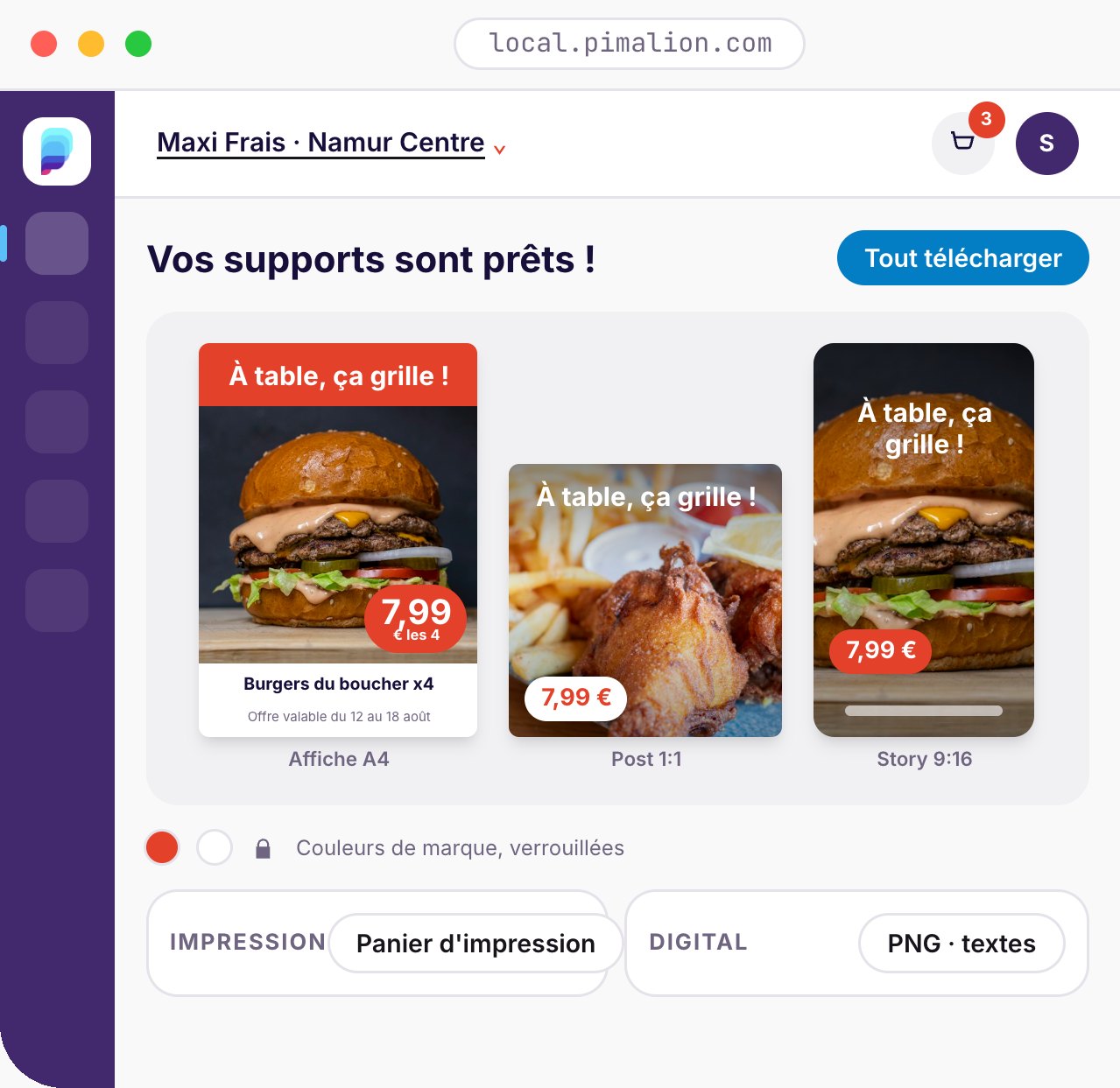
One-click campaigns
Head office presets its key promotions, the store launches them as a pack of formats.
Price posters from the PIM
Product, price and visual fill the template. The poster is generated by the engine.
Local event
Car boot sale, recruitment, building works: a poster, a post, a story, or all three.
From phone to Reel
A video shot in store, dressed automatically: jingle, watermark, sign-off.
Store flyer
Block templates, Excel import, discount vouchers, automatic placement.
Media library and basket
All the retailer’s assets and a print basket shared between colleagues.
From the print catalogue
to a product marketing platform.
Print remains a channel, but it is no longer the only one. Product data approved once feeds the web, campaigns, quote requests and buying guidance, without recreating content for each medium.
Dynamic web catalogue
Not a flipbook: departments, families, brands, search, filters, complete records.
Personalised per entity
Its own assortment, identity, points of sale and calls to action.
Landing pages and campaigns
Brand, range or operation pages, for emailings, QR codes and social media.
Quote requests and leads
The visitor describes their project, the request reaches the relevant entity.
Project configurators
Bathroom, heating, flooring: compatible products are suggested.
Search and AI assistant
Needs in natural language, an answer limited to approved products.
Product comparison
Several items side by side, in a consistent table.
From print to digital
QR codes to manuals, videos, updates, comparison and quotes.
Analytics
Products viewed, searches, quotes generated, performance per entity.
Digital foundation
A truly usable web version of the catalogue.
Conversion
Measurable lead generation.
Buying guidance
More useful for customers and sales staff.
Intelligence
A digital advisor based on Pimalion.
Content Factory
A permanent product marketing platform.
There is no need to launch everything at once: the first goal is a web catalogue personalised per entity, with search, filters, statistics and quote requests. The rest is added on the same foundation, without touching existing print.
Stop planning, start piloting.
The central, collaborative hub that unifies budgeting, space booking and automated production of every medium. From planning to execution, for frictionless retail media.
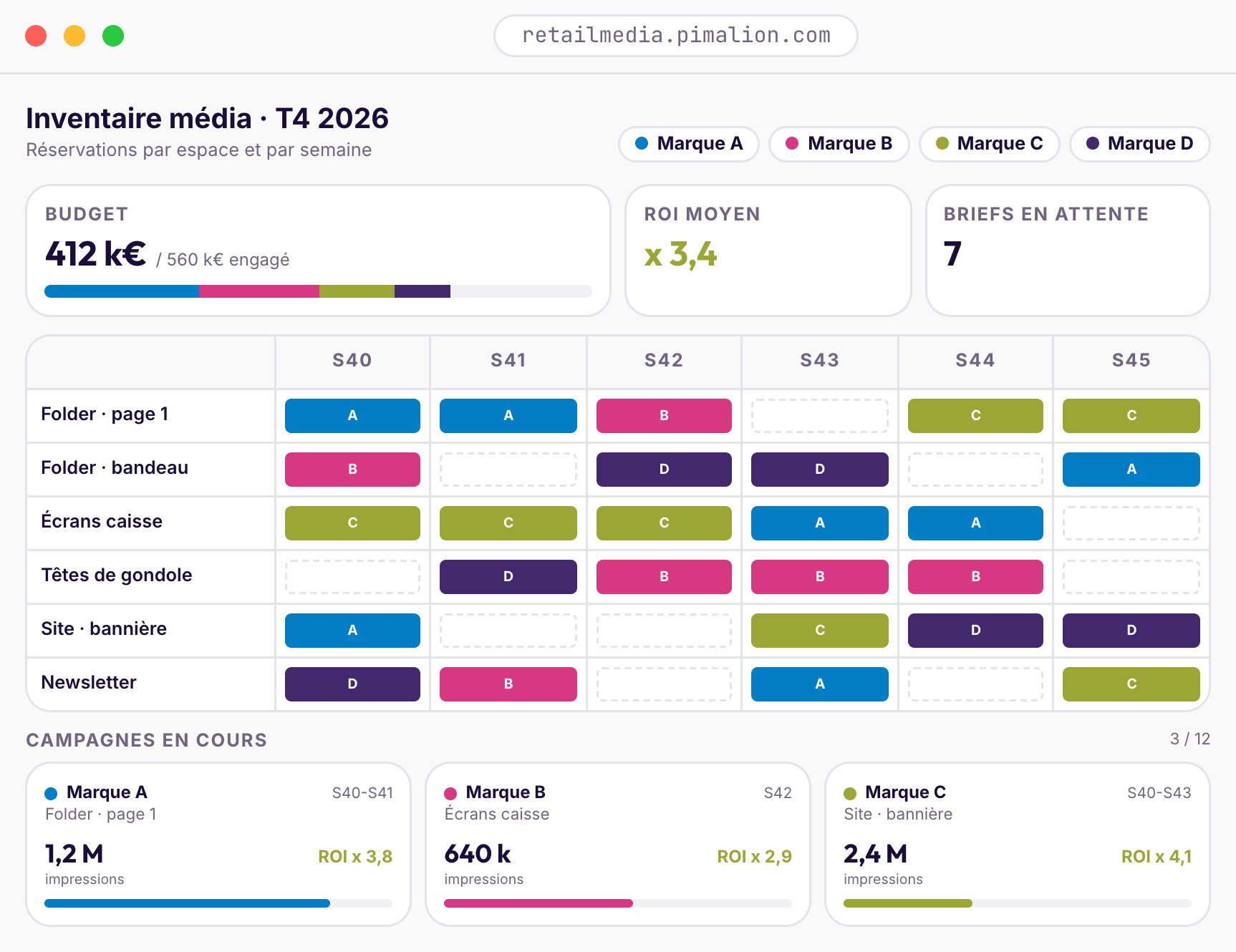
- Scattered budgeting. Controlling costs, pooling national and local.
- Slow creative. Thousands of variations per point of sale.
- Fragmented channels. One message in print, in-store and online.
- Lack of visibility. Clear metrics, from macro to micro.
Inventory
Physical and digital media spaces, booked online.
Budgets
Precise tracking and pooled economies of scale.
Briefs and approval
Marketing and technical briefs, approval cycles.
Mapping
From national to point of sale, a hierarchical view.
Collaboration
Retailer, brands and agencies on one platform.
Products and services
The whole offer can be promoted, not just products.
Automated production
The ART rendering engine produces every medium.
Measurement and API
ROI dashboards, data opened up via REST API.
Monetise your spaces and keep your communication consistent.
Fast, highly personalised execution of your campaigns.
Strategy and value creation, not production.
“We called on Pimalion to set up Carrefour Belgium’s Retail Media Planning platform. We worked hand in hand with Pimalion’s teams to build in our local needs. The developments meet the way we work with brands day to day.”
Five sectors, real-world workflows.
Drawn from our customers, from supplier to store.
From the flyer (leaflet, handout) to 30,000 posters, every week.
- The week’s offers are selected in the PIM, with their prices and mechanics.
- The Planner holds the promotional plan: every flyer, every edition, every language.
- The rendering engine composes the pages of the flyer, leaflet or handout from the PIM and the DAM.
- Marketing, buyers and agency annotate and approve the pages online.
- The approved flyer is adapted into posters, shelf wobblers and labels for each store.
- Retail media placements sold to brands are produced with the same engine.
One flyer a week, in every language.
- Data from the ERP, PDM and DAM comes together in a single repository.
- The studio builds the promotional plan in the Planner.
- Pages are laid out in InDesign, connected to Pimalion via EasyCatalog.
- Language versions are generated automatically.
- The flyer is approved online, then prepared for print.
- In-store signage is drawn from the same data.
Millions of items, reliable data.
- Suppliers’ Fab-Dis data is loaded automatically.
- Images and PDFs are downloaded and linked to products in the DAM.
- More than 100 quality rules, set by the buying group, check every record.
- Purify extracts, corrects and enriches whatever is missing.
- Members access the database through personalised interfaces.
Suppliers complete, members compose.
- Suppliers complete their records in their portal, guided by a completion score.
- From 70%, a record can be published: it goes into the buying group’s PIM.
- Each member chooses its suppliers, families and products.
- It brands its catalogue: cover, company page, terms and conditions.
- CatalogBuilder composes the catalogue, the order goes to the agency.
Eight clients, one platform, zero mix-ups.
- Each client has its own separate space: data, templates, publications.
- The studio runs thousands of operations in the Planner.
- The agency’s clients annotate and approve their pages online.
- The same engine produces print and digital for every client.
One platform. Three markets.
Industrialise your promotional communication.
Flyers, catalogues, in-store signage, retail media: everything starts from the same repository.
- Automated flyers, approved online
- Posters and labels per store
- Retail media for your partner brands
- Supplier and Dealer Portals as options
All your clients on a single platform.
Each client in a sealed space, your teams and your clients work together.
- Native, partitioned multi-label
- Online client approval
- Consolidated reporting
- Industrialised production
Records that retailers accept.
The Supplier Portal shows exactly what is missing and publishes your records to your distributors.
- One portal, one Pimalion account
- Score out of 100, clear priorities
- AI enrichment with Purify
- Shorter time-to-market
Real results,
measurable.
Retailers, buying groups and agencies: their figures, their words.
Carrefour Belgium
posters generated every week, in ~20 minutes
Hubo
stores in Belgium, weekly multilingual flyer
Socoda
items managed, across 1,400 data models
Mr. Bricolage
items serving 1,500 points of sale
Touch
clients served from one multi‑label platform
Items in the PIM and assets in the DAM
Socoda: around 6 million items in the PIM and 6.5 million assets in the Pimalion DAM.
What our customers say about us.
Pimalion provides a complete solution for Carrefour Belgium. We manage our leaflets in it, and our in-store communication too. Our communication to customers is consistent across the different media, and everything happens in real time.
Pimalion combines the strengths of our ERP, PDM, PIM and DAM systems and lets us create leaflets and in-store display material in a structured, well-organised way.
We have around 2 million items stored and managed in the Pimalion PIM and DAM, across 1,400 data models. Around this PIM, Socoda has put in place participative data governance.
Your questions, our answers.
What is the Pimalion platform?
The Product Content & Publishing Platform covers everything from acquiring product data (ETL, PDM, PIM, DAM) to publishing it on every channel (Campaign Manager, Planner, rendering engine, online approval, distribution). Around 180 features, in the cloud.
Do I need to take every offer?
No. The platform is the foundation. Purify, the Supplier Portal, the Dealer Portal and Retail Media Pilot are added as you need them, independently of one another.
Is Pimalion an agency?
No. Pimalion Studio supports the implementation and operation of the platform. Creative work stays with your teams and your agencies.
Does Pimalion replace InDesign?
It can: the built-in rendering engine produces your pages and PDFs. But if your studio works in InDesign, Pimalion connects to it via EasyCatalog.
Does Pimalion integrate with my ERP?
Yes. The ETL and the API connect Pimalion to your ERP, CRM, CMS, e-shops and digital signage systems.
How does a demo work?
We prepare it with an extract of your own data: your catalogue, your media, your channels. Allow 45 to 60 minutes.

Take
control
of all your
product content.
- Collect
- Enrich
- Centralise
- Distribute
- Measure
Take control
of your content.
Centralise. Control. Publish.
See Pimalion with your own data: your catalogue, your flyers, your channels. Never a generic demo.