

Skip to content

API · Application Program Interface

Connect Pimalion to your ecosystem

Integrate your ERP, CRM, e-commerce platforms, business systems and communication channels. Exchange your product data, media and publishing information through an open architecture and integration services suited to your needs.

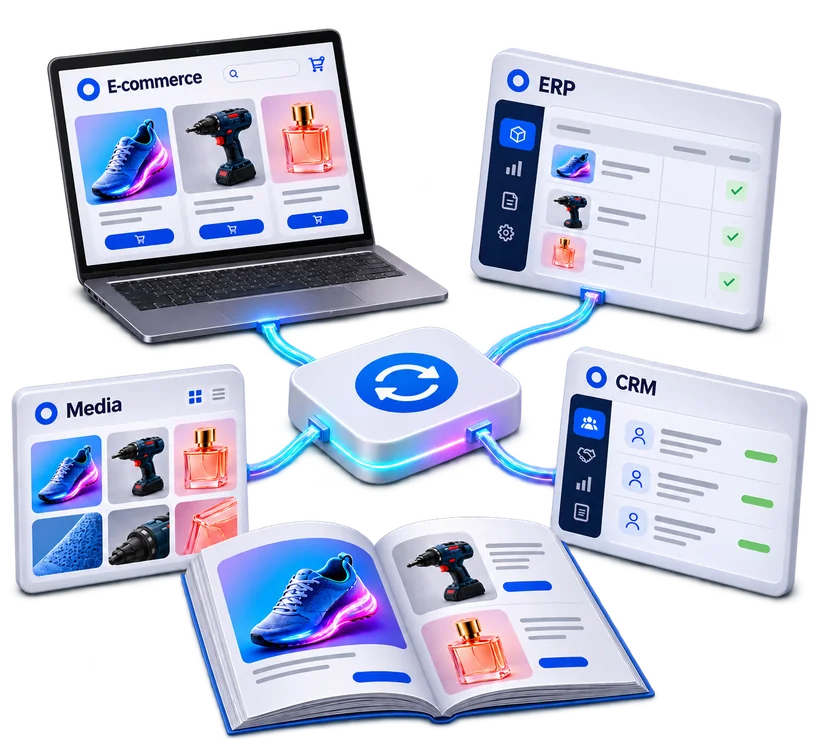
Pimalion connected to e-commerce, ERP, CRM, media and catalogues

An open platform at the heart of your information system

ERP, CRM, PIM, DAM, e-commerce platforms, marketing tools, graphic solutions and communication systems: your IT environment brings together many specialised applications, which need to exchange information to work efficiently.

Pimalion was designed to integrate into this ecosystem, without forcing you to replace your existing applications. With its APIs and integration services, the platform connects product data repositories, digital assets, business applications and publishing processes.

Data and content are not locked inside one application: they flow to the tools and teams that need them, and external systems can in turn feed Pimalion’s services.

Benefits

  • REST API documented with Swagger
  • ERP, e-commerce and CRM connected
  • Product data and media shared
  • API, ETL, DIS and DEX working together
  • Controlled access and permissions
  • Custom connectors with Pimalion Studio

The API in detail

Nine ways to integrate Pimalion into your information system

From documented interfaces to custom connectors, what makes the API the open layer of both value chains, Product Data and Multichannel Publishing.

A platform designed to work with your applications

Pimalion is built on an open architecture that connects its modules to the company’s information systems. The APIs provide documented exchange interfaces, usable by authorised applications and services.

Connectors and integration mechanisms then build flows suited to the constraints of each system. The aim is not to impose a single architecture, but to offer several means of integration depending on the project.

Capabilities

  • External REST API
  • Documented exchange interfaces
  • Connection to business applications
  • Structured data exchange
  • Standard and custom connectors
  • Services usable from external applications, depending on the resources exposed
  • SaaS architecture accessible remotely

Main benefit

A consistent information system that can evolve without creating new silos.

Remotely accessible does not mean no implementation: each integration requires configuration, authentication, mapping and sometimes development work.

The Pimalion difference

Several means of integration, suited to your systems

Every information system has its constraints. Pimalion combines the API, the ETL, the DIS and DEX micro-services and custom connectors, complementary rather than interchangeable, to build exchanges suited to each organisation.

  1. 01

    Source systems

    ERPs, suppliers, business applications

  2. 02

    DIS

    Automated file imports

  3. 03

    ETL

    Mapping, transformation, preparation

  4. 04

    PIM and DAM

    Products and digital assets

  5. 05

    API

    Interactions with authorised applications

  6. 06

    DEX

    Automated outbound flows

  7. 07

    Connectors

    E-commerce, CRM, specific tools

  8. 08

    Destinations

    Sales and communication channels

API, ETL, DIS, DEX: who does what?

The API offers an exchange interface to authorised applications. The ETL collects, maps and transforms data. DIS automates file imports, including from systems without an API; DEX automates outbound flows. A connector actually links two applications according to their needs.

  • Application interfaces
  • Data transformation
  • Inbound and outbound flows

Exchanges under control

Authentication, permissions and access restrictions frame the integrations. Each flow is defined according to your applications, your responsibilities and the security rules of your environment.

  • Authorised access
  • Defined permissions
  • Exchange tracking

Integrations designed with Pimalion Studio

When software, a format or a process falls outside the standard, Pimalion Studio analyses the need, designs the integration and develops custom connectors on a project basis.

  • Flow analysis
  • Custom connectors
  • Support for IT teams

An API when systems can talk to each other directly. Integration services and connectors when data needs to be transformed, transferred or synchronised in another way.

Uses

Integrations suited to every system

From ERPs to in-store screens, the API and connectors link Pimalion to the applications your teams use every day.

ERP and business systems

References, prices and logistics data integrated via API, file flows or ETL, depending on each system’s capabilities.

Value
Operational data serving product content.

E-commerce

Product sheets, attributes and media sent to online sales platforms. Example: HAIRDIS and Shopify.

Value
Continuity between the repository and online product pages.

CRM and emailing

Content and commercial information made available to customer relationship and marketing automation tools.

Value
Campaigns fed with up-to-date content.

Retail

Data from operational systems used in national and local campaigns and publications. Example: CARREFOUR.

Value
Commercial operations built on reliable data.

Graphic production

Product and media repositories linked to existing graphic tools such as InDesign and EasyCatalog. Example: HUBO / COLOS.

Value
Pimalion services integrated into production tools.

Digital signage and applications

Content and files sent to display systems, portals and mobile applications, depending on the interfaces in place.

Value
Content available at every touchpoint.

FAQ

Frequently asked questions about the API and connectors

A technical question? Talk to an expert during a personalised demo.

Book a demo
What is the Pimalion API?

A set of REST interfaces that allow authorised applications to interact with the resources exposed by Pimalion.

What is the difference between an API and a connector?

The API provides an exchange interface. A connector uses this interface, or other compatible mechanisms, to actually link two applications.

What is the difference between the API and the ETL?

The API enables interactions between applications. The ETL organises the import, mapping, transformation and preparation of the data exchanged.

Does the API work with an existing ERP?

Yes, depending on the ERP’s integration capabilities. Exchanges can also go through the ETL or automated file transfers with DIS.

Can Pimalion be used with Shopify or PrestaShop?

Yes. Pimalion integrates with e-commerce platforms through suitable connectors and services, existing or built on a project basis depending on the platform.

Can a CRM be connected?

Yes, depending on the interfaces available and the scope of the exchanges to be set up.

Is there documentation for developers?

Yes. The API is documented with Swagger (OpenAPI): endpoints, parameters, data structures and responses.

What data can be retrieved or updated?

It depends on the endpoints exposed, the permissions and the integration scope. Resources may cover product content, media or publications.

Are the APIs secure?

Integrations are subject to Pimalion’s authentication and authorisation mechanisms, the details of which are set out in the documentation.

Does anything need to be installed?

The SaaS API is accessible remotely, but an integration requires configuration, authentication, mapping and sometimes development work.

Can a custom connector be developed?

Yes. Pimalion Studio develops integrations for specific applications or needs, depending on the interfaces available.

Can the API trigger the generation of a publication?

Graphic generation is handled by the Publishing services. The operations available via the API are defined according to the endpoints and the project.

Can Pimalion be connected to digital signage?

Yes, depending on the display systems and the interfaces in place.

Take the next step

See Pimalion with your own data.

A tailored demo: your catalogue, your flyers, your channels. 45 to 60 minutes.

  • With your data

    Your catalogue, your media

  • 45 to 60 minutes

    Prepared for your business

  • A clear quote

    Only the offers you need