

Skip to content

ETL · Extract · Transform · Load

Connect your sources, automate your flows

Collect, transform, harmonise and exchange your product data between your ERPs, suppliers, PIMs, applications and communication channels, in a flexible, automated integration environment.

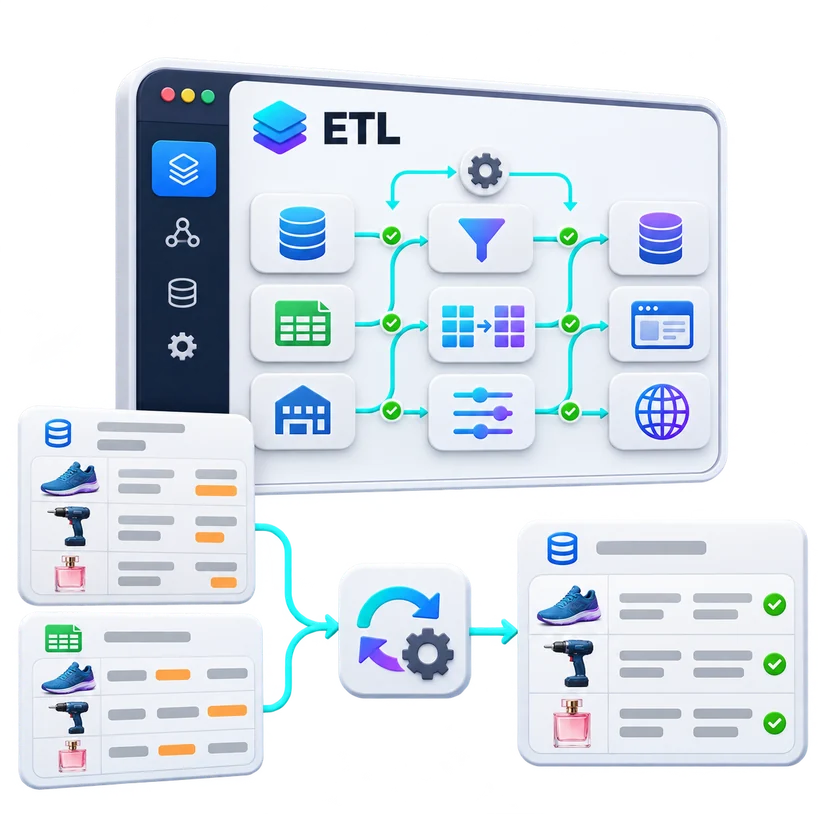
ERP and supplier files mapped, transformed and checked in the ETL, then synchronised as validated product records

Make full use of your data, from source to publication

In most companies, product information is scattered: ERPs, supplier databases, Excel files, business applications, PIMs, e-commerce platforms and production systems, each with its own structures, formats and rules.

Pimalion’s ETL module organises these exchanges. Its mapping, conversion, control and sync tools transform information to fit your needs and automate inbound and outbound flows. With DIS and DEX, these exchanges extend to external systems, including those without an API.

The ETL is one of the platform’s engines: it keeps data continuous, from its sources to product content and commercial publications.

Benefits

  • Multiple sources: Excel, CSV, XML, JSON, ERP, API
  • Reusable mapping templates
  • Anomalies detected on import
  • Automated imports, even without an API (DIS)
  • Exports to EasyCatalog and your applications (DEX)
  • Data kept up to date all the way to publications

ETL

Micro-services

Standalone services that run continuously around the ETL, with no action from your teams.

Always on

DIS

Data Import Service

Continuous import of CSV, XLS, XML and JSON files, even from systems without an API.

DEX

Data Export Management

Exports to EasyCatalog, Magento, PrestaShop, WooCommerce, Mailchimp and custom connectors.

The ETL in detail

Six capabilities for controlled data flows

From heterogeneous sources to automated exchanges, what makes the ETL an integration engine rather than a simple import and export tool.

All your sources, brought together in consistent processes

An ERP provides references, prices and logistics; a supplier provides technical characteristics and visuals. Pimalion’s ETL extracts this information from your ERPs, databases, office files, supplier feeds, applications and web services, depending on the interfaces available.

It is then prepared for the target repository and your business rules. Integration is not limited to one-off imports: it fits into recurring processes that keep data up to date.

Capabilities

  • Excel and CSV import
  • XML and JSON files
  • Web services and APIs
  • Data from ERPs
  • Supplier feeds
  • Business databases
  • One-off or recurring imports
  • Scraping and crawling, depending on services enabled

Main benefit

Centralised acquisition, without forcing a single format on all your source systems.

Scraping and crawling apply within configured services and to legally accessible sources.

The Pimalion difference

An integration engine at the heart of the Product Data chain

At Pimalion, data does not stop at the repository. The ETL organises acquisition, transformation and exchange; the PDM, PIM, DAM and Purify take over; and integrated data feeds campaigns and publications directly.

  1. 01

    Sources

    ERPs, suppliers, files, databases

  2. 02

    ETL and DIS

    Acquisition, mapping, transformation

  3. 03

    PDM

    Structure, quality, governance

  4. 04

    PIM and DAM

    Products and digital resources

  5. 05

    Purify

    AI enrichment

  6. 06

    DEX and API

    Exchanges to destinations

  7. 07

    Publishing

    Campaigns and publications

Integrated data, all the way to your media

Imported and structured information feeds the publishing engines: catalogues, folders, POS, posters and digital media. Flows also send data to EasyCatalog.

  • Graphic templates fed
  • PIM and Publishing exchanges
  • Print and digital data

Collect what is not sent to you

When information does not exist as a structured file, scraping, crawling and API services retrieve it from accessible sources, then prepare it for your repositories.

  • Web scraping and crawling
  • API integrations
  • Collected data converted

An adaptable architecture

Modules combine without imposing a single path. Purify can even work standalone with a third-party system: data does not have to go through Pimalion’s PIM.

  • Combinable modules
  • Standalone Purify
  • Existing systems kept

Multiple sources. Controlled flows. Content ready to use.

Business uses

Flows suited to every sector

From food retail ERP feeds to B2B supplier catalogues, the same integration engine serves very different needs.

Food retail

ERP and supplier data prepared for marketing, then made available to national and local campaigns. Example: CARREFOUR.

Value
Operational data working for commercial communication.

DIY and garden

Supplier catalogues integrated, nomenclatures matched, multilingual publications fed. Example: HUBO / COLOS.

Value
Large assortments from heterogeneous sources.

Professional distribution

Data from many suppliers acquired, mapped and standardised for buying groups and distributors. Example: SOCODA.

Value
Industrialised supplier flows, all the way to publications.

Automotive

Accessory content from several sources, with multi-brand and multilingual requirements. Example: D’IETEREN AUTOMOTIVE.

Value
Complex, specialised information, organised.

E-commerce

Structured content sent to online sales platforms and kept in sync. Example: HAIRDIS and Shopify.

Value
Continuity between the repository and online listings.

AI and third-party systems

Automated exchanges between an existing PIM and a standalone enrichment service. Example: FOUSSIER, with Purify and Pimcore.

Value
Enriched data, without replacing the systems in place.

FAQ

Frequently asked questions about the ETL

Another question? Ask it during a personalised demo.

Book a demo
What is an ETL?

An integration tool that extracts data, transforms it according to defined rules, then loads it into a destination system.

What is the difference between an ETL and a PIM?

The ETL organises how data flows and is transformed. The PIM centralises and structures product information for commercial use. The two are complementary.

Does the ETL work with an existing ERP?

Yes. Flows are configured according to the ERP’s exchange options and the connectors available.

Can data be imported without an API?

Yes. DIS automates the import of structured files, including from systems with no API.

Can mappings be reused?

Yes. Saved mapping templates reapply the defined correspondences and rules to each new import.

Can data exchanges be automated?

Yes. The integration mechanisms and the DIS and DEX services set up automated exchanges, depending on the systems and configuration.

Can data be exported to EasyCatalog?

Yes. DEX handles exchanges with EasyCatalog, within the agreed integration scope.

Which formats can be used?

Including Excel, CSV, XML and JSON, as well as exchanges with web services and APIs.

How are errors handled?

The ETL identifies anomalies and presents a summary of import results. Logging, alert and recovery arrangements depend on the features configured.

Does the ETL improve data quality?

It checks formats, harmonises values and transforms content. More advanced business processing is handled alongside by the PDM and Purify.

Can the ETL feed publications?

Yes. The Pimalion ecosystem links integration flows to repositories and publishing processes, notably through the DPS and DEX.

Can Purify be used with a third-party PIM?

Yes. Purify works as a standalone service connected to an existing system. The FOUSSIER project, with Pimcore, illustrates this approach.

Take the next step

See Pimalion with your own data.

A tailored demo: your catalogue, your flyers, your channels. 45 to 60 minutes.

  • With your data

    Your catalogue, your media

  • 45 to 60 minutes

    Prepared for your business

  • A clear quote

    Only the offers you need