

Supplier Portal
Your suppliers complete their product records. You stop rekeying.
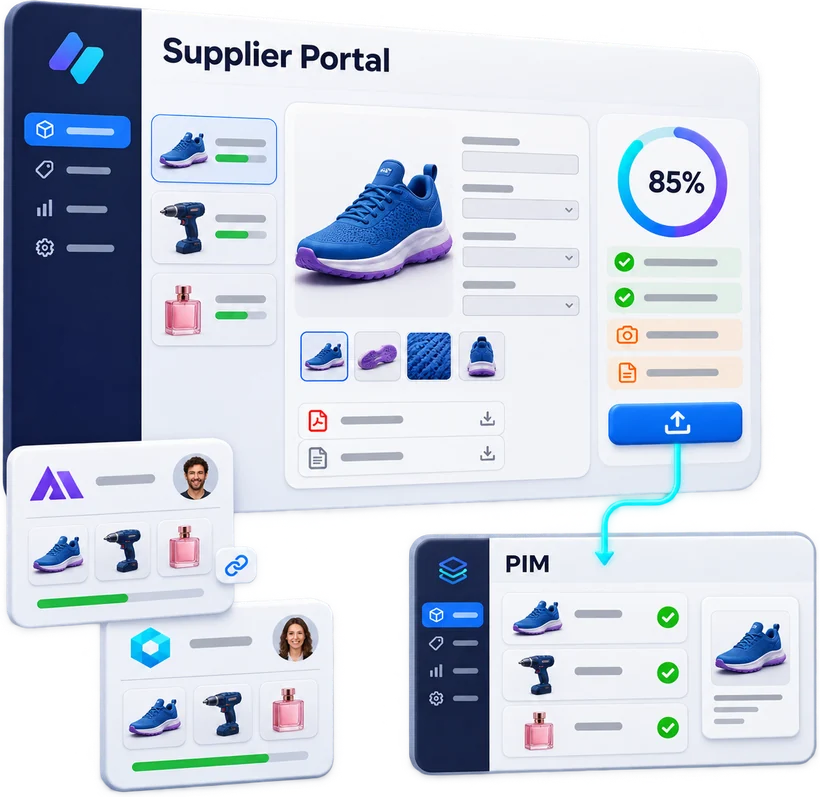
Every supplier gets its own portal: product records, visuals, documents. A completion score shows what is missing and where to start. Once a record is ready, the supplier publishes it: it goes straight into your PIM, ready for your publications. The portal can be used on its own, or together with the Dealer Portal.
-
100
completion points, in 5 groups
-
70%
publishing threshold, enforced server-side
-
19
quality criteria, not just presence checks
The journey
Publish means shipped.
- 01
Retrieve
The supplier imports what the PIM already knows about its products. Each time, it chooses: fill empty fields, or overwrite.
- 02
Complete
Identity, description, specifications, pricing and logistics, visuals and documents. Every tab shows what is missing.
- 03
Prioritise
Criteria are ranked by points lost. The highest-value records clear the threshold with just a few more fields.
- 04
Publish
From 70%, the record can be published. It goes into the PIM and becomes read-only.
In practice · 01
A dashboard that answers three questions
Where do I stand, what is blocking, where do I start. Every counter is clickable and opens the filtered list it summarises.

In practice · 02
A score that measures quality
A four-word description does not count. The tagline needs 40 characters, the long description 200, selling points and specifications at least three lines each.
In practice · 03
Highest value first
Priorities are calculated in points lost (number of records multiplied by the weight of the criterion), not simply by number of records.
The completion model
100 points. Quality, not just presence.
A field only counts when it is filled in properly. The publishing threshold is enforced server-side: neither the form nor bulk actions can bypass it.
Features
And also
Linked visuals and documents
Drag and drop, a designated main image, file roles (packshot, lifestyle shot, spec sheet, user guide, certificate, video) and secure links.
Bulk actions and tracked imports
Publish, revert to draft, archive in bulk. Imports run on the server, can be followed in notifications and stopped if needed.
Field-by-field history
Every change is logged with its date, its author and a before-and-after view.
Company details, entered once
Identity, main contact, logistics (incoterm, lead times, minimum order), terms and conditions: they feed the supplier pages in catalogues.
One account, several companies
A single Pimalion account can manage several suppliers and switch between them in one click.
A product record without a photo cannot be printed. The portal says so, clearly, before the retailer finds out.
Take the next step
See Pimalion with your own data.
A tailored demo: your catalogue, your flyers, your channels. 45 to 60 minutes.
-
With your data
Your catalogue, your media
-
45 to 60 minutes
Prepared for your business
-
A clear quote
Only the offers you need