

Skip to content

DAM · Digital Asset Management

Much more than a media library

Centralise, organise, search, enrich and transform all your digital assets in a collaborative environment, directly connected to your product data and your multichannel publications.

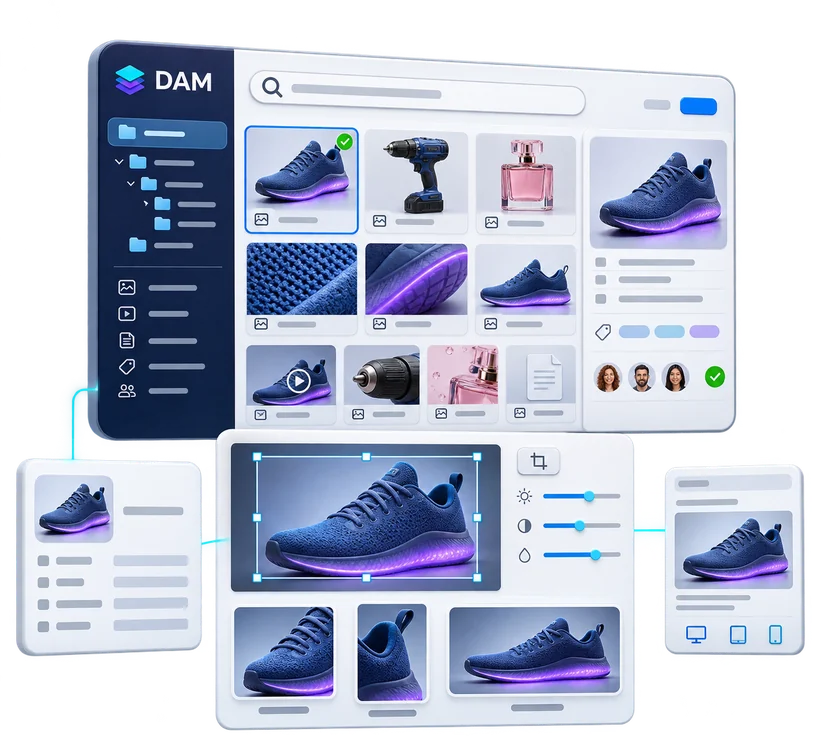
DAM media library with search, filing and asset details, cropping and renditions of a product photo for print, web and mobile

Your digital content at the heart of your commercial communications

Pimalion’s DAM manages the company’s entire digital heritage in one centralised environment. Product images, lifestyle photos, videos, documents, graphic files and PDFs are imported, classified, searched and made available to authorised teams and partners.

Metadata, advanced search and AI recognition make resources easy to identify and reuse. Automated services adapt media to the requirements of each channel: print, web or digital publications.

What sets it apart: its native integration with the PIM and Multichannel Publishing. The same assets are linked to products, used in campaigns, placed in catalogues and folders, adapted for digital and traced in every one of their uses.

Benefits

  • Centralised media library: images, videos, PDFs, graphic and 3D files
  • Multi-criteria search, enriched by product data
  • AI recognition: subjects, objects, logos, colours, text (OCR)
  • Automatic linking of media to PIM products
  • Automatic versions per channel, cut-outs, cropping
  • Rights, usage validity and traceability in publications

DAM

Micro-services

Standalone services that run continuously around the DAM, with no action from your teams.

Always on

IPS

Image Processing Service

Automated image processing and IPTC/XMP indexing, up to 100,000 HD images processed an hour.

DEM

DAM Event Monitoring

Continuously syncs your external DAMs: local server, Dropbox, sFTP and agency websites.

DAM AI

DAM Artificial Intelligence

Automatic recognition and tagging, keywords in several languages, content indexed and quickly found.

BRS

Background Removal Service

Automatically removes image backgrounds, one at a time or in batch, with no manual retouching.

The DAM in detail

Six capabilities for a professional media library

From centralisation to syncing external sources, what turns scattered files into a usable digital heritage.

All your digital assets in one shared environment

Product photos, advertising visuals, videos, technical documents, supplier sheets, logos and graphic files form a heritage that is essential to your business. Pimalion’s DAM brings them together in a collaborative media library, open to authorised teams and contributors.

Each asset is identified, documented and organised through its metadata and classification rules. Content is no longer filed away in folder after folder: it becomes structured, searchable and reusable.

Capabilities

  • Images, videos, documents, PDFs and graphic files
  • Vector and 3D files, depending on supported formats
  • Categories, families and collections
  • File identification and indexing
  • Descriptive and technical metadata
  • Multi-entity and multi-label organisation
  • Shared or banner-specific resources
  • Collaborative access to media

Main benefit

A scattered set of files becomes an organised, usable digital heritage.

The Pimalion difference

From source file to published communication, seamlessly

A traditional DAM answers the question: where is the asset? Pimalion goes further. The DAM, the PIM and Multichannel Publishing share one platform: media are linked to products, adapted for each channel, used in campaigns, and you know where they were published.

  1. 01

    Collect

    Suppliers, agencies, servers

  2. 02

    Centralise

    Assets in the DAM

  3. 03

    Classify

    Metadata and AI recognition

  4. 04

    Link

    To products in the PIM

  5. 05

    Transform

    Versions with IPS

  6. 06

    Select

    Content for campaigns

  7. 07

    Produce

    Catalogues, folders, POS, digital

  8. 08

    Approve

    Publications in the PAT

  9. 09

    Trace

    Media that use the asset

The right visual, linked to the right product

The DAM is natively connected to the PIM. Naming and identification rules automatically attach files to product references: the main photo, extra views, lifestyle shot, technical drawing and PDFs of one item stay together.

  • Several media per product
  • Media from product records
  • Unlinked media flagged

Your assets traced into their publications

A product image is used in a folder, then in an in-store poster and a digital publication. The DAM keeps the link with every medium that uses it.

  • Usage history
  • Documents using a media file
  • Products, media and publications linked

Media ready for every channel

The graphic production engines draw directly on the DAM, and IPS supplies each template with the right version, from print to digital.

  • Assets in templates
  • Print and digital versions
  • Reuse across campaigns

Pimalion’s DAM connects the company’s digital heritage to its day-to-day use in commercial communications.

Business uses

A DAM suited to every sector

From food retail packshots to B2B technical documents, the same foundations serve very different needs.

Food retail

Product photos, packshots, promotional visuals, logos and graphic resources for folders, posters, POS and digital media.

Value
The right media, fast, for frequent promotional campaigns.

DIY and garden

Large assortments, technical documents, lifestyle visuals and many catalogue and folder editions.

Value
Large media repositories connected to intensive, multilingual production.

Professional distribution

Supplier assets, documentation, technical images and files for professional catalogues.

Value
Industrialised use of media coming from many sources.

Automotive

Media and documents for accessories, ranges and distinct brands.

Value
Structured resources in a specialised, multi-brand, multilingual environment.

E-commerce

Visuals for product pages, categories and digital content.

Value
A consistent media repository to feed online sales.

Communication agencies

Resources from several advertisers, with separate spaces and processes.

Value
Easier campaigns and collaboration, respecting each client’s identity.

FAQ

Frequently asked questions about the DAM

Another question? Ask it during a personalised demo.

Book a demo
What is the difference between a DAM and plain file storage?

File storage keeps files in folders. A DAM adds metadata, classification, advanced search, rights management, collaboration and media use. Pimalion adds native integration with products and publications.

What is the difference between a PIM and a DAM?

The PIM organises product information: characteristics, attributes, descriptions, references and commercial data. The DAM manages the digital resources that go with them: images, videos, documents and other media. In Pimalion, the two are directly connected.

Can the DAM be used without the PIM?

Yes. Pimalion’s DAM works as a standalone asset management environment, and can be connected to the platform’s other modules at any time.

Can the DAM connect to existing sources?

Yes. Integration and sync services retrieve media from different environments, depending on the connectors and configuration chosen.

How do I find a media file quickly?

Search draws on metadata, classifications, and information linked to products and publications. AI recognition also helps identify resources.

Can images be transformed automatically?

Yes. IPS prepares transformations and versions suited to print and digital media, according to configured rules.

Does the DAM handle rights and validity dates?

The DAM stores information on rights, validity and conditions of use. The control rules that apply depend on the features and configuration implemented.

Can I see which publications used a media file?

Yes. The DAM’s integration with Publishing lets you find the publications that use a resource within the Pimalion environment.

Is the DAM suited to several brands or banners?

Yes. Multi-entity and multi-label organisation structures and shares resources to meet the needs of each brand and organisation.

Can the DAM feed e-commerce?

Yes. Media in the DAM are linked to product content and sent to e-commerce channels through the configured integrations and feeds.

Take the next step

See Pimalion with your own data.

A tailored demo: your catalogue, your flyers, your channels. 45 to 60 minutes.

  • With your data

    Your catalogue, your media

  • 45 to 60 minutes

    Prepared for your business

  • A clear quote

    Only the offers you need